
As an Amazon Influencer, we earn from qualifying purchases you might make if you click any of the links or buttons on this page.
Last reviewed: August 15, 2026
The Core Ultra 5 250K Plus makes motherboard overspending particularly easy to spot.
This is an unlocked 18-core desktop processor with 6 performance cores, 12 efficiency cores, boost clocks up to 5.3GHz, a 125W processor base power and a 159W maximum turbo power.
It also officially supports DDR5-7200 and works with Intel’s existing 800-series motherboard platform.
That means you do not automatically need Z890. A good B860 motherboard can provide PCIe 5.0 graphics, Gen5 NVMe, Thunderbolt 4, fast Ethernet, Wi-Fi 7 and memory overclocking.
The main reason to move from B860 to Z890 is much simpler: you want CPU/BCLK overclocking, Intel 200S Boost or the larger Z890 expansion/I/O budget.
The motherboards I would shortlist for the Core Ultra 5 250K Plus

MSI PRO B860M-A WIFI
The sensible place to stop spending if Micro-ATX works and three NVMe positions already cover your storage plan.
- 3 M.2 slots with Gen5 primary storage
- Thunderbolt 4, 5GbE and Wi-Fi 7
- Limitation: less rear USB and physical expansion than the full-size Tomahawk

MSI MAG B860 TOMAHAWK WIFI
The best balance if you want a full-size board with strong networking, Thunderbolt and enough expansion without paying for Z890 tuning.
- 3 full-speed M.2 positions + PCIe 5.0 graphics
- Thunderbolt 4, 5GbE, Wi-Fi 7 and rich rear USB
- Limitation: B860 does not provide Intel’s Z890 CPU/BCLK overclocking support
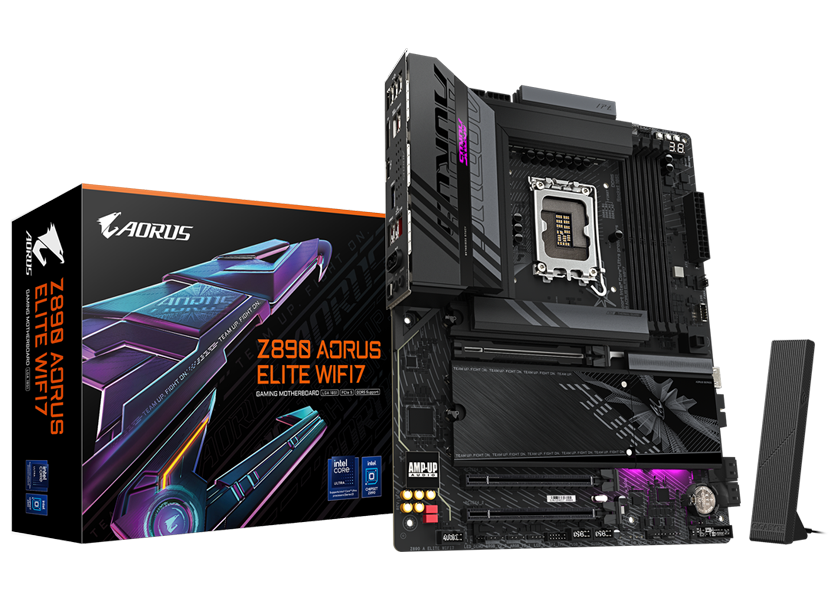
GIGABYTE Z890 AORUS ELITE WIFI7
The step-up choice when you bought the unlocked 250K Plus because processor tuning or Intel 200S Boost is part of the build.
- 4 M.2 slots, Thunderbolt 4 and PCIe 5.0
- Z890 CPU/BCLK tuning + Intel 200S Boost capability
- Limitation: only 2.5Gb Ethernet
Compare the best Core Ultra 5 250K Plus motherboards
Swipe → to see the full comparison
| Motherboard | Chipset | Size | M.2 | Ethernet | Thunderbolt | Best for | Check |
|---|---|---|---|---|---|---|---|
| MSI PRO B860M-A WIFI | B860 | Micro-ATX |
3 total 1 × Gen5 |
5GbE | 1 × TB4 | Best value | |
| MSI B860 TOMAHAWK WIFI | B860 | ATX |
3 total 1 × Gen5 |
5GbE | 1 × TB4 | Best for most builds | |
| Z890 AORUS ELITE WIFI7 | Z890 | ATX |
4 total 1 × Gen5 |
2.5GbE | 1 × TB4 | CPU tuning / 200S Boost |
B860 or Z890 for the Core Ultra 5 250K Plus?
For this CPU, I would start with B860 rather than Z890.
Intel allows memory overclocking on B860, so you can still use XMP memory and tune DDR5.
B860 also does not inherently prevent the CPU from using its normal turbo behavior.
What Intel reserves for Z890 is IA/CPU overclocking and BCLK overclocking.
Buy B860 if…
You want to install the 250K Plus, enable XMP, use the CPU normally and build a fast gaming or general-purpose PC without spending additional money on manual CPU tuning.
That describes a large percentage of buyers.
Buy Z890 if…
CPU/BCLK overclocking is specifically part of the project, you want Intel 200S Boost, or your system needs Z890’s larger chipset expansion and high-speed I/O budget.
In those situations you are paying for functionality, not just a more expensive chipset name.
Do not buy Z890 just because the processor name ends in K
The K suffix tells you the processor is unlocked.
It does not mean you have to use the unlocked functionality. If you never plan to tune the processor, a well-equipped B860 board can be a better use of the complete PC budget.
What about Intel 200S Boost?
This is the strongest argument for buying Z890 with the 250K Plus even if you do not want to manually tune every CPU setting.
Intel says the Core Ultra 200S Plus processors are compatible with the Intel 200S Boost BIOS profile.
On a supported Z890 motherboard and compatible memory configuration, 200S Boost can increase fabric, die-to-die and memory frequencies while retaining Intel’s stated warranty support for the profile.
Intel’s 2026 guidance specifically includes warranty-supported memory operation up to DDR5-8000 under the profile’s defined limits.
Z890 has a purpose here — but make that purpose explicit
If you intend to enable 200S Boost, the Z890 AORUS Elite is a rational upgrade. If you will leave the system at ordinary CPU settings, B860 remains the more economical starting point.
The three motherboard picks in detail
1. MSI PRO B860M-A WIFI
This is the board I would check first if the goal is to build around the 250K Plus without turning the motherboard into an expensive part of what is supposed to be a value-oriented CPU platform.
The surprising part is how little connectivity MSI actually removes.
The main graphics slot runs at PCIe 5.0 x16, and the primary M.2 connection is CPU-connected PCIe 5.0 x4.
A second M.2 slot runs at Gen4 x4 and the third at up to Gen4 x2, which is more than enough storage expansion for many gaming PCs.
You also retain a rear 40Gbps Thunderbolt 4 Type-C connection, 5Gb Ethernet and Wi-Fi 7.
That is an unusually complete set of connectivity for a board that should normally sit below enthusiast Z890 models.
The tradeoff is not CPU compatibility. It is the physical board and I/O budget.
Micro-ATX gives you less usable expansion room below a large GPU, and the rear USB selection is clearly lighter than on the B860 Tomahawk.
Onboard audio is also the basic ALC897 solution.
Buy it if: Micro-ATX works, three NVMe drives are enough and you want to keep more of the budget for the GPU.
Skip it if: you want more physical expansion space and considerably richer rear USB connectivity.
2. MSI MAG B860 TOMAHAWK WIFI
The Tomahawk is the board I would choose when somebody wants a conventional full-size PC and would rather avoid thinking about motherboard compromises later.
Storage remains three M.2 positions, but all three can run at x4: the primary CPU-connected slot at Gen5 x4 and the other two through the B860 chipset at Gen4 x4.
There are also four SATA connections.
Rear I/O is one of the main reasons I prefer it for a full-size build. MSI gives you a Thunderbolt 4 Type-C connection, several 10Gbps USB Type-A ports, another 10Gbps Type-C port, 5Gb Ethernet, Wi-Fi 7, optical audio, Clear CMOS and Flash BIOS.
Four EZ Debug LEDs also help identify CPU, memory, graphics or boot-device problems.
Power delivery is entirely adequate for a 250K Plus running its normal 159W maximum turbo power envelope.
I would therefore not move to Z890 because somebody tells you the B860 Tomahawk has a “weaker VRM.”
Move to Z890 because you actually want the tuning capability.
Buy it if: you want a full-size, feature-complete Intel build and have no interest in manual CPU/BCLK overclocking.
Skip it if: the Micro-ATX PRO board saves enough money and you do not need the additional USB and physical expansion.
3. GIGABYTE Z890 AORUS ELITE WIFI7
This is where I would move if the reason you bought an unlocked Core Ultra 5 250K Plus was that you intend to use the unlocked part.
Intel’s Z890 chipset provides IA/CPU, BCLK and memory overclocking, whereas B860 is limited to memory overclocking.
That also makes Z890 the relevant platform for Intel 200S Boost.
The AORUS Elite is a sensible way to get those capabilities without immediately moving into Maximus Hero or MEG ACE pricing.
Storage is stronger than on the two B860 recommendations: four M.2 positions, including one CPU-connected Gen5 x4 connection and three Gen4 slots.
The primary graphics slot is PCIe 5.0 x16.
Rear connectivity includes Thunderbolt 4, several USB connections, Wi-Fi 7 and optical audio.
GIGABYTE also uses an ALC1220 audio implementation and its EZ-Latch mechanisms simplify GPU and M.2 removal.
The odd compromise is networking.
Despite being the Z890 recommendation, the AORUS Elite has 2.5Gb Ethernet while both MSI B860 recommendations provide 5Gb.
That is not a major issue on a 1Gb or 2.5Gb home network, but it is worth understanding before assuming the Z890 board wins every specification comparison.
Buy it if: CPU/BCLK tuning, Intel 200S Boost or four onboard NVMe positions justify moving to Z890.
Skip it if: you intend to run the CPU normally and would rather have 5Gb Ethernet than Z890 tuning controls.
What actually matters when choosing a 250K Plus motherboard
1. Decide whether CPU overclocking is real or theoretical
This decision immediately tells you whether you need Z890.
If you know you will manually tune CPU ratios or BCLK, choose Z890.
If you normally install the CPU, enable XMP and start using the PC, B860 gives up much less than the chipset hierarchy makes it sound.
2. B860 still supports memory overclocking
This is easy to miss.
You do not need Z890 simply to use an XMP DDR5 kit.
Intel lists memory overclocking support on B860 as well as Z890.
Z890’s distinction is the additional IA/CPU and BCLK tuning capability.
3. DDR5-7200 is already official on the 250K Plus
The Plus processors improve Intel’s official memory support from DDR5-6400 on the original desktop 200S generation to DDR5-7200.
That makes a fast two-DIMM setup easier to justify without automatically chasing extreme overclocking frequencies.
4. DDR5-8000 is optional, not a requirement
Intel 200S Boost provides warranty-supported memory overclocking up to DDR5-8000 under its specified conditions.
That does not mean every 250K Plus build needs an 8000 MT/s kit.
Capacity, latency, motherboard support and stability remain part of the decision.
5. Start with two DIMMs
High DDR5 frequencies are easier to achieve with one memory module per channel than with four populated DIMMs.
For 32GB, 48GB, 64GB or 96GB systems, a matched two-DIMM kit is normally the cleaner approach.
6. Three M.2 slots are enough for most 250K Plus builds
One SSD for Windows and applications, one large game/project drive and one future slot is already a comfortable configuration.
The fourth M.2 position on the Z890 AORUS Elite is useful, but it should not justify a chipset upgrade by itself unless your storage plan actually needs it.
7. Thunderbolt 4 is unusually easy to get on this platform
All three main recommendations include a rear Thunderbolt 4 connection.
That means you do not need to buy a flagship Z890 motherboard simply to connect a fast Thunderbolt SSD, dock or compatible display setup.
8. 5Gb Ethernet is only useful when the network supports it
Both MSI B860 boards provide 5Gb Ethernet.
If your router, switch and NAS are 1Gb or 2.5Gb devices, that extra capability may go unused.
If you regularly move large files to a fast NAS, however, it can be more useful than many motherboard “premium” features.
9. Do not choose by VRM phase count alone
The 250K Plus has a maximum turbo power specification of 159W.
All three main boards have competent power delivery for that class of processor.
Once that requirement is satisfied, spending more for an even larger VRM should be justified by overclocking goals or another board feature rather than by fear that the CPU will somehow run poorly.
Other Core Ultra 5 250K Plus motherboards worth considering
MSI MAG B860M MORTAR WIFI
The upgraded Micro-ATX alternative to the PRO B860M-A. It keeps three M.2 slots, Thunderbolt 4, 5GbE and Wi-Fi 7 but adds MSI’s more gaming-oriented heatsinks, layout and build features.
I would buy it over the PRO board only when those extras justify the current price difference.
MSI MPG Z890I EDGE TI WIFI
The Mini-ITX alternative if you genuinely want a small-form-factor build while retaining Z890 tuning.
Its four-M.2 implementation, 5Gb Ethernet, Wi-Fi 7 and dual Thunderbolt 4 are unusually strong for Mini-ITX, but the board only makes economic sense when compact size is part of the goal.
GIGABYTE Z890 AORUS ELITE WIFI7 ICE
The white-build version to check when aesthetics are part of the system design.
Choose it for the visual theme rather than expecting a meaningful CPU-performance advantage over the standard AORUS Elite.
Already own an LGA1851 motherboard?
You probably do not need to replace it
Intel says the Core Ultra 200S Plus desktop processors remain compatible with current 800-series motherboards already on the market.
That means an existing B860 or Z890 board may only need an appropriate BIOS update.
Check your manufacturer’s CPU-support page before spending money on another motherboard.
The 250K Plus motherboard decision in 30 seconds
Lowest sensible spend
Choose the MSI PRO B860M-A WIFI if Micro-ATX works and three M.2 drives are enough.
Best for most builds
Choose the MSI B860 TOMAHAWK WIFI if you want ATX, richer rear I/O and more physical expansion.
CPU tuning / 200S Boost
Choose the Z890 AORUS ELITE WIFI7 when Z890’s actual tuning capability is something you intend to use.
Micro-ATX but nicer
Compare the B860M MORTAR WIFI when you want the compact format but prefer MSI’s more feature-rich MAG implementation.
Continue building your Core Ultra 5 250K Plus PC
Core Ultra 5 250K Plus motherboard FAQ
What is the best motherboard for the Core Ultra 5 250K Plus?
For most builds, I would start with the MSI MAG B860 TOMAHAWK WIFI. It provides three M.2 slots, PCIe 5.0 graphics and storage, Thunderbolt 4, 5Gb Ethernet and Wi-Fi 7 without making you pay for Z890 CPU-overclocking features you may never use.
Does the Core Ultra 5 250K Plus need Z890?
No. Intel states that the 200S Plus desktop processors remain compatible with current 800-series chipset motherboards. B860 is therefore a valid platform for the 250K Plus.
Can B860 overclock the Core Ultra 5 250K Plus?
Intel lists memory overclocking support for B860 but not IA/CPU or BCLK overclocking. Z890 supports IA, BCLK and memory overclocking.
Can I use XMP memory on B860?
Yes. B860 supports memory overclocking, and boards such as the MSI B860 Tomahawk and PRO B860M-A support Intel XMP memory profiles.
Does the Core Ultra 5 250K Plus support DDR5-7200?
Yes. Intel’s official specification for the processor lists support for DDR5 memory up to 7200 MT/s.
Does the 250K Plus support Intel 200S Boost?
Yes. Intel states that the Core Ultra 200S Plus processors are compatible with the Intel 200S Boost BIOS profile. A compatible Z890 motherboard, BIOS and memory configuration are required.
Do I need DDR5-8000?
No. DDR5-8000 is an optional overclocked configuration associated with Intel 200S Boost and other memory tuning. DDR5-7200 is already within Intel’s official specification for the 250K Plus.
How many M.2 slots should I get?
Three is enough for most gaming and general-purpose systems. Four or more becomes more useful for large local storage libraries, creator workloads or users who expect several future SSD upgrades.
Is the MSI PRO B860M-A enough for the 250K Plus?
Yes. It supports the LGA1851 Core Ultra platform and provides appropriate power delivery, PCIe 5.0 graphics, Gen5 primary M.2, Thunderbolt 4, 5Gb Ethernet and Wi-Fi 7. Its main compromises are board size, rear USB and expansion rather than CPU capability.
Is the Z890 AORUS Elite worth it over B860?
It is worth considering when you intend to use CPU/BCLK overclocking, Intel 200S Boost or its fourth M.2 slot and larger Z890 I/O budget. For a stock-clock system, the B860 boards may offer better value.
Does the Core Ultra 5 250K Plus have integrated graphics?
Yes. The 250K Plus includes Intel Graphics. The 250KF Plus is the corresponding model without integrated graphics.
Specification references
CPU and motherboard specifications were checked against current Intel, MSI and GIGABYTE documentation. CPU and memory support can change with BIOS versions, so verify the exact motherboard support page before purchasing.

- Best Motherboards for Intel Core Ultra 5 250K Plus in 2026 - August 15, 2026
- Best Motherboards for Intel Core Ultra 7 270K Plus in 2026 - August 15, 2026
- Best Motherboards for Ryzen 7 9850X3D in 2026 - August 15, 2026