
As an Amazon Influencer, we earn from qualifying purchases you might make if you click any of the links or buttons on this page.
Last reviewed: August 20, 2026
H810, B860 and Z890 all belong to Intel’s 800-series desktop platform for LGA1851 Core Ultra processors.
The important differences are not simply “budget, mid-range and premium.”
Intel gives each chipset a different amount of PCIe connectivity, USB/high-speed I/O and overclocking capability.
For most gaming and general-purpose PCs, B860 lands in the useful middle: it supports memory overclocking while offering enough platform resources for boards with PCIe 5.0 graphics, Gen5 NVMe, Thunderbolt 4, Wi-Fi 7 and fast networking.
H810 vs B860 vs Z890 specifications
Swipe → to see the full comparison
| Feature | H810 | B860 | Z890 |
|---|---|---|---|
| Total platform PCIe lanes | 24 | Up to 34 | Up to 48 |
| Total high-speed I/O lanes | Up to 33 | Up to 45 | Up to 60 |
| Chipset PCIe 4.0 lanes | 8 | Up to 14 | Up to 24 |
| Processor PCIe 5.0 lanes | Up to 16 | Up to 20 | Up to 20 |
| Processor lane configuration | 1 × x16 | 1 × x16 + 1 × x4 | More flexible x16 / x8 / x4 configurations |
| Memory overclocking | No | Yes | Yes |
| IA / CPU overclocking | No | No | Yes |
| BCLK overclocking | No | No | Yes |
| Integrated Thunderbolt 4 / USB4 | Up to 1 | Up to 1 | Up to 2 |
| USB 20Gbps ports | 0 | Up to 2 | Up to 5 |
| USB 10Gbps ports | Up to 2 | Up to 4 | Up to 10 |
| Best use | Basic / inexpensive PC | Most gaming and general PCs | Overclocking / expansion-heavy builds |
Which Intel chipset should you buy?
What H810 actually gives you
H810 is not unusable.
It is simply designed around a much narrower system configuration.
Intel gives H810 24 total platform PCIe lanes compared with up to 34 on B860 and 48 on Z890.
It also has substantially less USB and other high-speed I/O capacity.
Most importantly for enthusiasts, Intel does not enable memory, IA/CPU or BCLK overclocking on H810.
Do not confuse “XMP support” with H810 memory overclocking
Some individual H810 motherboard specifications may mention support for Intel XMP 3.0 profiles.
Intel’s chipset specification still does not list memory overclocking support for H810.
Treat H810 as a stock-memory platform rather than assuming it has the same XMP/DDR5 tuning flexibility as B860 or Z890.
That makes H810 sensible for intentionally simple systems rather than enthusiast gaming builds with a long list of future upgrades.
Why B860 is the sweet spot for most people
B860 fixes most of the limitations that matter to a mainstream enthusiast without charging you for CPU-overclocking capability you may never use.
Intel officially enables memory overclocking on B860.
It also increases the total platform PCIe budget to as many as 34 lanes and the high-speed I/O budget to as many as 45 lanes.
Processor connectivity can include 20 PCIe 5.0 lanes, allowing manufacturers to expose a Gen5 x16 graphics connection plus a separate Gen5 x4 storage connection.
B860 can already be a very high-connectivity motherboard
The MSI B860 Tomahawk combines PCIe 5.0 graphics, Gen5 NVMe, three M.2 slots, Thunderbolt 4, 5Gb Ethernet and Wi-Fi 7.
If those features already cover the build, moving to Z890 solely because it is the higher chipset tier accomplishes very little.
What Z890 adds over B860
The main functional difference is CPU tuning.
Z890 is the consumer 800-series chipset where Intel enables IA/CPU overclocking, BCLK overclocking and memory overclocking.
It also expands the total platform budget to as many as 48 PCIe lanes and 60 high-speed I/O lanes.
That gives motherboard designers more room for extra M.2 drives, PCIe expansion, high-speed USB, networking controllers and enthusiast features.
Intel 200S Boost is a real reason to choose Z890
Intel’s 200S Boost profile is designed for supported unlocked Core Ultra processors paired with a compatible Z890 motherboard and suitable memory.
Intel currently lists processors including the Core Ultra 7 270K Plus, Core Ultra 5 250K Plus, Core Ultra 9 285K, Core Ultra 7 265K/KF and Core Ultra 5 245K/KF.
If 200S Boost is part of your build plan, Z890 has a clear purpose.
Three motherboards that show the chipset differences
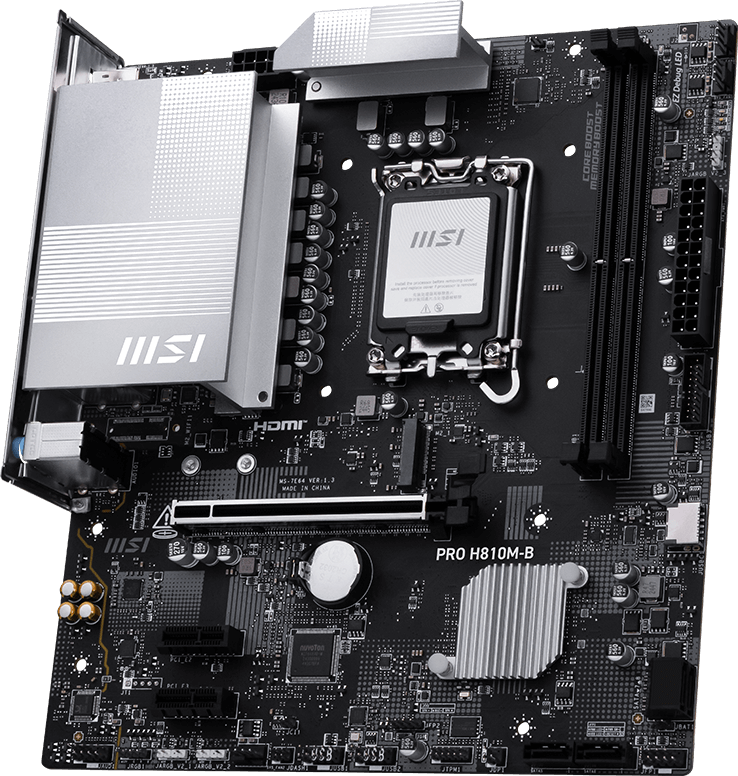
MSI PRO H810M-B
Shows what a sensible barebones LGA1851 motherboard can provide without pretending to be an enthusiast platform.
- PCIe 5.0 x16 graphics + Gen4 x4 M.2
- 2.5GbE and two DDR5 DIMM slots
- Limitation: only one M.2 slot and no chipset-level memory overclocking

MSI MAG B860 TOMAHAWK WIFI
Shows why B860 is enough for most higher-quality gaming builds.
- 3 M.2 slots + Gen5 NVMe
- Thunderbolt 4, 5GbE and Wi-Fi 7
- Limitation: no official IA/BCLK CPU overclocking
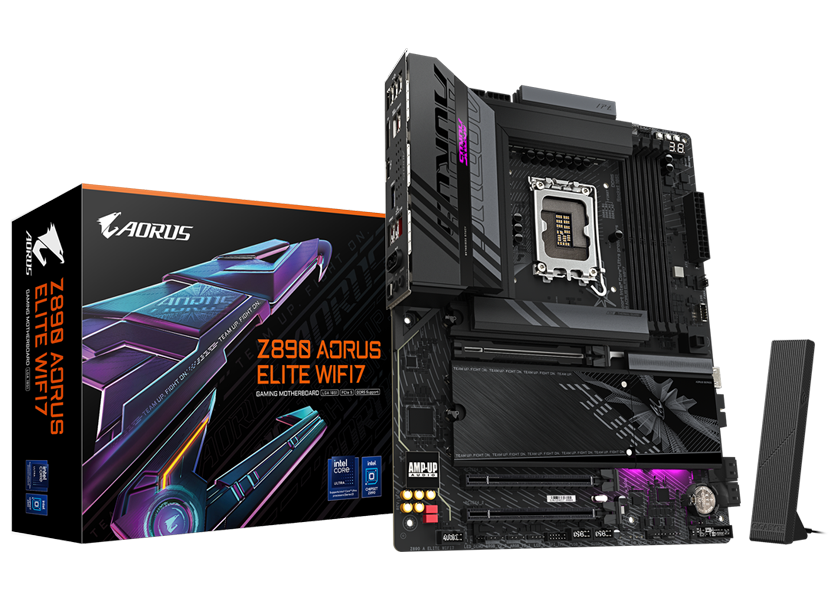
GIGABYTE Z890 AORUS ELITE WIFI7
Shows the useful Z890 path without jumping directly to an expensive flagship motherboard.
- 4 M.2 slots + PCIe 5.0 x16
- CPU/BCLK tuning, Thunderbolt 4 and Wi-Fi 7
- Limitation: 2.5GbE despite the higher chipset tier
What the chipset differences look like on real motherboards
MSI PRO H810M-B
The PRO H810M-B is useful because it demonstrates that an H810 motherboard does not necessarily mean an ancient connectivity standard.
The main graphics slot can operate at PCIe 5.0 x16.
MSI also provides a 2.5Gb Ethernet connection rather than stopping at ordinary Gigabit LAN.
The limitations appear when you look at expansion.
There is one M.2 slot, and it runs at PCIe 4.0 x4.
You get two DDR5 memory slots, four SATA ports and a relatively simple rear USB configuration.
There is no onboard Wi-Fi.
Those limits are not a problem in a machine designed around one SSD, Ethernet and a simple peripheral setup.
They become much more noticeable if you start treating the board as the foundation for repeated storage and peripheral upgrades.
Buy H810 if: the PC is intentionally simple and the price saving over B860 is substantial.
Skip H810 if: you want several NVMe drives, memory overclocking, richer USB, built-in wireless or a stronger long-term expansion path.
MSI MAG B860 TOMAHAWK WIFI
The B860 Tomahawk shows how large the practical jump from H810 can be.
The graphics slot still runs at PCIe 5.0 x16, but the processor’s additional PCIe 5.0 connectivity allows MSI to provide a separate Gen5 x4 M.2 position.
The other two M.2 connections run at Gen4 x4.
That gives you three properly useful NVMe positions before touching the four SATA connectors.
The board also has four DDR5 DIMM slots and supports memory overclocking and Intel XMP.
Rear connectivity includes Thunderbolt 4, multiple 10Gbps USB connections, 5Gb Ethernet and Wi-Fi 7.
This is why B860 should not be thought of as a severely cut-down chipset.
For most users, the thing it actually removes compared with Z890 is CPU/BCLK tuning rather than everyday connectivity.
Buy B860 if: you want a modern gaming or productivity PC with fast memory, Gen5 storage, Thunderbolt and strong networking but do not need manual CPU/BCLK overclocking.
Skip B860 if: Intel 200S Boost, manual processor tuning or a much heavier expansion configuration is part of the plan.
GIGABYTE Z890 AORUS ELITE WIFI7
The AORUS Elite demonstrates a sensible reason to move from B860 into Z890 without immediately buying a flagship motherboard.
You gain access to Intel’s CPU/IA and BCLK overclocking capability.
On supported BIOS versions and processors, Z890 is also the platform used for Intel 200S Boost.
Storage expands to four M.2 positions.
One is CPU-connected PCIe 5.0 x4, another is CPU-connected Gen4, and the remaining two come through the chipset.
The primary graphics slot runs at PCIe 5.0 x16.
Networking is Wi-Fi 7 plus 2.5Gb Ethernet.
That last specification is worth noticing: the B860 Tomahawk actually gives you faster wired Ethernet at 5Gb.
A higher chipset does not guarantee that every individual motherboard feature is superior.
Buy Z890 if: CPU tuning, 200S Boost, more PCIe/M.2 expansion or a specific Z890 motherboard feature makes the extra cost useful.
Skip Z890 if: the B860 board already has every port and storage connection your system needs.
BC Zone video: GIGABYTE Z890 AORUS ELITE WIFI7 review
If Z890 sounds like the right chipset for your build, this BC Zone review takes a closer look at the AORUS Elite and compares where it sits against boards such as the Z890 Eagle, MSI Z890 Tomahawk, ASRock Taichi Lite and ASUS ProArt.
H810 vs B860 vs Z890 for DDR5 and XMP
This is one of the most misunderstood differences between the chipsets.
H810
Intel does not list memory overclocking support.
Treat it as the stock-memory option even if an individual motherboard lists XMP-profile compatibility.
B860
Intel officially enables memory overclocking.
This is enough for normal XMP-based DDR5 tuning without moving to Z890.
Z890
Memory overclocking plus IA/CPU and BCLK controls.
Best suited to users who want deeper platform tuning rather than simply loading an XMP profile.
What about Core Ultra 200S Plus?
Intel’s 2026 Core Ultra 200S Plus launch did not replace the 800-series motherboard platform.
Intel says the new processors remain compatible with existing 800-series motherboards already on the market.
That includes H810, B860 and Z890, although the exact motherboard may require a BIOS update.
The newer processors also raise official memory support to DDR5-7200.
Do not assume every 200S Plus feature works identically on every board
Intel’s early 4-rank CUDIMM support is specifically described as being available on selected 800-series motherboards.
Check the exact CPU-support list, BIOS notes and memory QVL before buying high-capacity or unusual memory configurations.
Is Z890 faster than B860 for gaming?
Not simply because it is Z890.
If the same processor, graphics card and memory configuration are operating correctly on both boards, the chipset label itself does not create an automatic gaming-performance advantage.
Z890 can improve performance when you actively use features such as CPU overclocking or Intel 200S Boost.
That is different from saying every Z890 system is faster than every B860 system.
For many gamers, spend the motherboard difference elsewhere
If B860 already gives you the storage and connectivity you need, extra budget may produce a more noticeable result in the graphics card, monitor, SSD capacity or cooling.
Do you need Z890 for a K-series Core Ultra CPU?
No.
The K suffix means the processor is unlocked.
It does not mean you are required to use the unlocked features.
A K-series processor can still make sense on B860 when the CPU will run at normal settings and the system needs B860’s connectivity rather than Z890 overclocking.
Choose Z890 when the unlocked functionality is something you intend to use.
Do you need Z890 for Thunderbolt 4?
No.
Intel’s platform allows up to one integrated Thunderbolt 4 / USB4 connection on B860, and manufacturers can implement it directly.
The MSI B860 Tomahawk is a good example, with a rear 40Gbps Thunderbolt 4 Type-C connection.
Z890 raises the platform maximum to two integrated Thunderbolt 4 / USB4 ports, but the exact implementation always depends on the motherboard.
How much expansion do you really need?
Simple system
One GPU, one NVMe SSD and perhaps SATA storage can fit comfortably within H810’s narrower platform.
Normal enthusiast PC
Three M.2 drives, one GPU and a secondary PCIe card are the sort of configuration where B860 becomes much more comfortable.
Expansion-heavy system
Multiple NVMe drives, capture cards, accelerators and lots of high-speed I/O are where Z890’s larger lane budget becomes useful.
Which chipset fits your Core Ultra processor?
Core Ultra 5 250K Plus
Start with B860. Choose Z890 if CPU tuning or Intel 200S Boost is part of the reason you bought the unlocked CPU.
Core Ultra 7 270K Plus
B860 still works well at normal CPU settings. Z890 becomes easier to justify for tuning or heavier expansion.
Core Ultra 7 265K
B860 is a valid choice if you do not intend to overclock the CPU. Z890 is the correct platform when you want its unlocked controls.
Core Ultra 9 285K
B860 can run the CPU, but systems built around an Ultra 9 are more likely to have the tuning, storage and expansion needs that make Z890 worthwhile.
When I would actually buy H810
I would consider H810 for:
- an inexpensive office desktop,
- a straightforward home PC,
- a system with one SSD and few future expansion requirements,
- or a build where the H810 board saves a meaningful amount of money.
I would not choose H810 merely to save a very small amount over B860.
B860’s additional M.2, memory tuning and I/O flexibility are likely to remain useful much longer than the initial price difference.
When I would buy B860
This is the easiest recommendation.
Buy B860 when you want a good LGA1851 gaming or general-purpose motherboard and do not plan to manually overclock the CPU.
It is also where I would start for most Core Ultra 5 and Core Ultra 7 systems.
A well-designed B860 motherboard can already offer nearly every connectivity feature most users associate with a “high-end” board.
When I would buy Z890
Choose Z890 when at least one of these is true:
- You want manual IA/CPU overclocking.
- You want BCLK overclocking.
- You intend to use Intel 200S Boost.
- You need substantially more PCIe expansion.
- You need more high-speed USB/I/O than a suitable B860 board provides.
- A specific Z890 motherboard has a feature your workload genuinely needs.
If none of those describe the PC, you probably do not need Z890.
What I would avoid
Do not buy by chipset prestige
H810, B860 and Z890 are not performance scores.
They define platform capabilities.
Buy the lowest chipset tier that already gives the finished PC the memory, storage, networking, I/O and tuning features it needs.
The H810 vs B860 vs Z890 decision in 30 seconds
Buy H810
For a deliberately basic, inexpensive PC with limited storage and no memory or CPU overclocking requirements.
Buy B860
For most gaming and general-purpose PCs. You get memory overclocking and a much healthier expansion/I/O budget.
Buy Z890
For CPU/BCLK tuning, Intel 200S Boost or systems that actually need the chipset’s larger PCIe and I/O capacity.
Continue comparing Intel motherboards
H810 vs B860 vs Z890 FAQ
Is B860 better than H810?
For most enthusiast and gaming PCs, yes. B860 offers memory overclocking, a larger PCIe and high-speed I/O budget and greater motherboard expansion flexibility. H810 remains useful for deliberately simple low-cost systems.
Is Z890 better than B860?
Z890 provides more platform PCIe and high-speed I/O resources plus IA/CPU and BCLK overclocking. Whether that makes it better depends on whether your system will actually use those features.
Does H810 support memory overclocking?
Intel does not list memory overclocking support for H810. Some motherboard specifications may mention XMP profile support, but that should not be interpreted as B860/Z890-style memory overclocking capability.
Does B860 support XMP and memory overclocking?
Yes. Intel officially lists memory overclocking support for B860, and individual B860 boards can support Intel XMP memory profiles.
Can B860 overclock the CPU?
Intel does not officially enable IA/CPU or BCLK overclocking on B860. Those controls are available on Z890.
Do I need Z890 for Intel 200S Boost?
Yes. Intel specifies compatible Z890 motherboards as part of the 200S Boost platform requirements.
Does B860 support PCIe 5.0?
Yes. B860 can expose processor PCIe 5.0 connectivity for graphics and storage. Individual motherboard implementation still matters.
Can H810 have a PCIe 5.0 graphics slot?
Yes. H810 supports processor PCIe 5.0 connectivity for the main graphics link, and boards such as the MSI PRO H810M-B implement a PCIe 5.0 x16 primary slot.
Does B860 support Thunderbolt 4?
Yes. Intel allows an integrated Thunderbolt 4 / USB4 connection on B860, although the motherboard manufacturer must implement it.
Is Z890 faster for gaming?
Not automatically. Z890 can provide additional performance if you actively use overclocking or Intel 200S Boost, but the chipset name itself does not make the same stock-clock CPU and GPU faster.
Should I use B860 with a K-series CPU?
It can make sense if you do not plan to use manual CPU/BCLK overclocking. Choose Z890 when you specifically want the processor’s unlocked tuning functionality.
Do Core Ultra 200S Plus CPUs work on H810 and B860?
Intel states that the Core Ultra 200S Plus processors remain compatible with existing Intel 800-series motherboards. The exact board may require an appropriate BIOS update.
Specification references
Chipset and motherboard specifications were checked against current Intel, MSI and GIGABYTE documentation. Exact CPU, memory and slot behavior can change with motherboard revision and BIOS version.
- Intel — H810, B860 and Z890 chipset comparison
- Intel — 800 Series Desktop Chipsets
- Intel — 200S Boost Overclocking Profile
- Intel — Core Ultra 200S Plus platform compatibility
- MSI — PRO H810M-B specifications
- MSI — MAG B860 TOMAHAWK WIFI specifications
- GIGABYTE — Z890 AORUS ELITE WIFI7 specifications
- BC Zone — GIGABYTE Z890 AORUS ELITE WIFI7 Review

- Best Gaming Motherboards in 2026 - August 20, 2026
- H810 vs B860 vs Z890: Which Intel Chipset Should You Buy? - August 20, 2026
- B850 vs X870 vs X870E: Which AM5 Chipset Should You Buy? - August 20, 2026