
As an Amazon Influencer, we earn from qualifying purchases you might make if you click any of the links or buttons on this page.
Last reviewed: August 21, 2026
The Ryzen 7 9850X3D is unusually forgiving of memory speed because its large 3D V-Cache reduces how often gaming workloads need to reach out to system memory.
That changes how I would shop for RAM.
Instead of paying a large premium for DDR5-6400, DDR5-8000 or extremely tight enthusiast timings, I would put the emphasis on the right capacity, two matched DIMMs, AMD EXPO support and proven motherboard compatibility.
The RAM kits I would pair with the Ryzen 7 9850X3D

G.Skill Flare X5 32GB DDR5-6000 CL30
The kit I would start with for a gaming-first 9850X3D build: two DIMMs, EXPO, low latency and no unnecessary capacity.
- 32GB (2×16GB), DDR5-6000 CL30
- AMD EXPO, 1.35V, 33mm low-profile design
- Limitation: 32GB is less comfortable for memory-heavy creator, VM or local-AI workloads
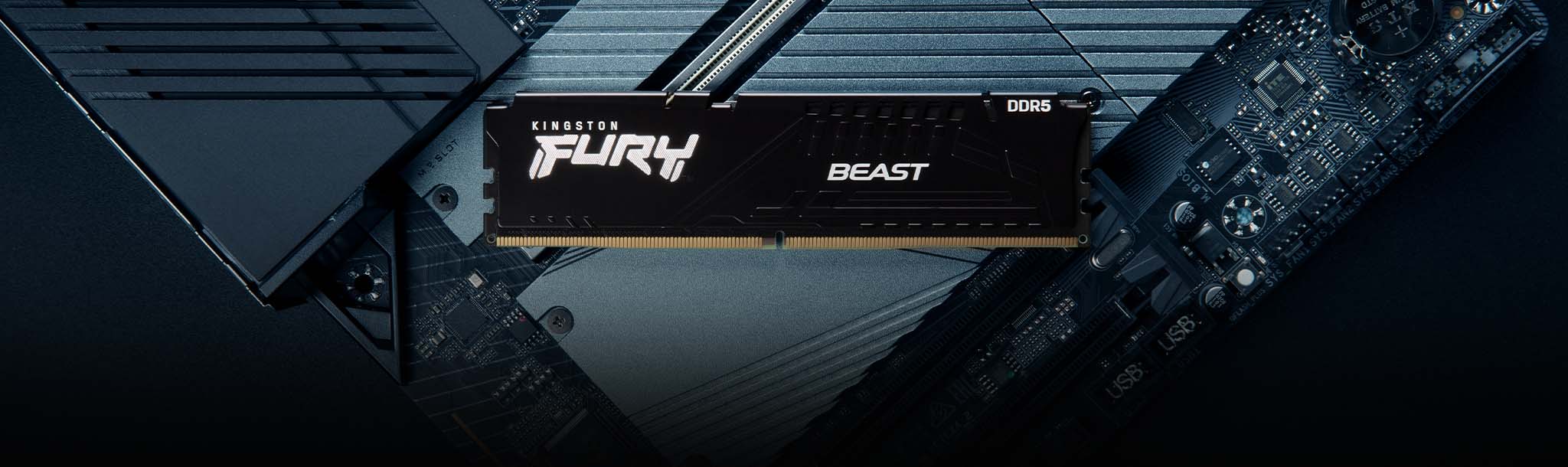
Kingston Fury Beast 64GB DDR5-6000 CL30
The capacity I would choose when the same 9850X3D PC handles gaming, streaming, editing and heavier multitasking.
- 64GB (2×32GB), DDR5-6000 CL30
- AMD EXPO, low-profile heat spreader
- Limitation: unnecessary capacity for a straightforward gaming-only system
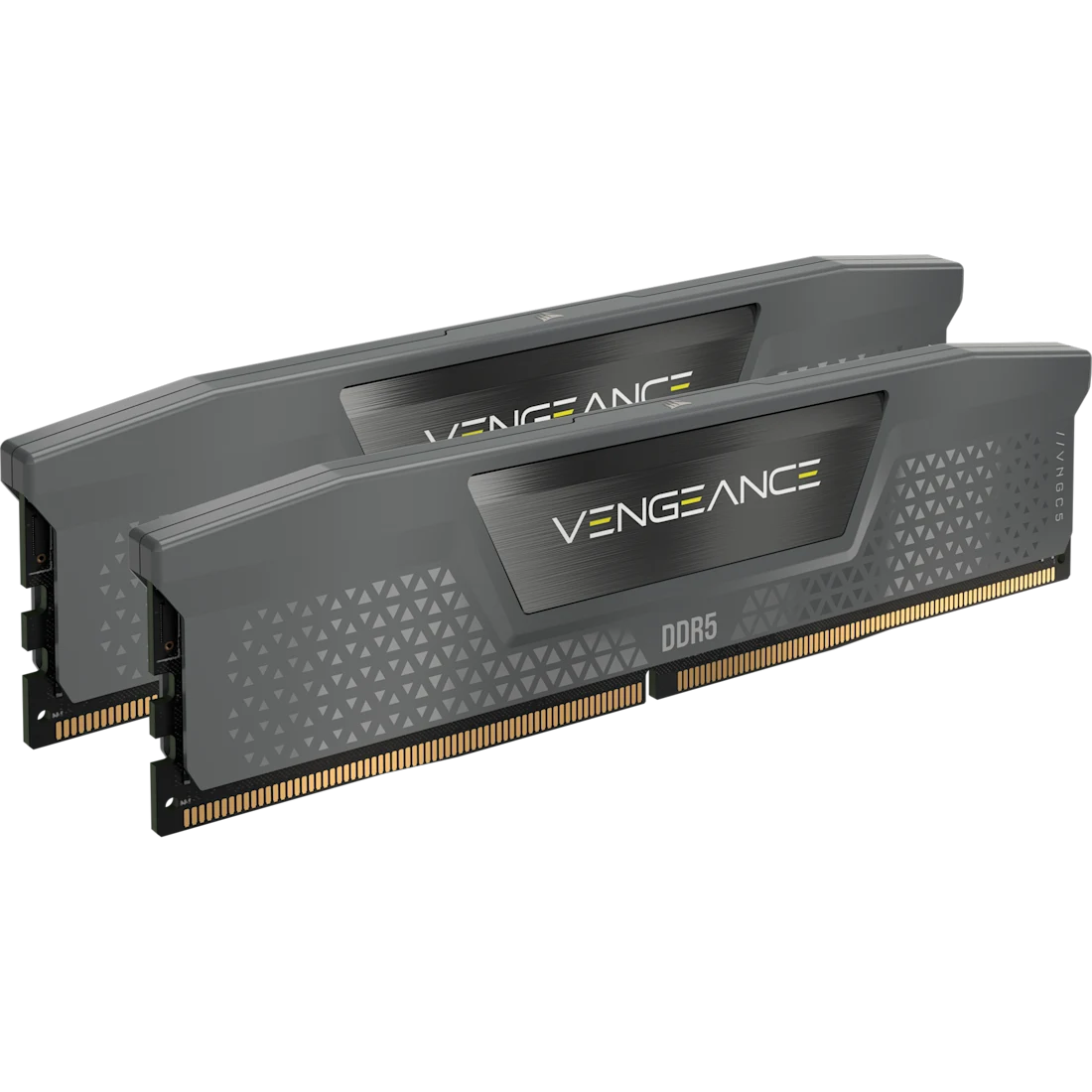
Corsair Vengeance 96GB DDR5-6000 CL30
A two-DIMM high-capacity option for the relatively small group of 9850X3D systems that genuinely need more than 64GB.
- 96GB (2×48GB), DDR5-6000 CL30
- AMD EXPO + Intel XMP, compact heat spreader
- Limitation: expensive and unnecessary for gaming alone
Compare the best RAM for the Ryzen 7 9850X3D
Swipe → to see the full comparison
| Memory kit | Capacity | Configuration | Speed | Timings | Voltage | Profile | Best for | Check |
|---|---|---|---|---|---|---|---|---|
| G.Skill Flare X5 | 32GB | 2×16GB | 6000MT/s | CL30-38-38-96 | 1.35V | AMD EXPO | Gaming-first PC | |
| Kingston Fury Beast | 64GB | 2×32GB | 6000MT/s | CL30-36-36 | 1.40V | AMD EXPO | Gaming + creation | |
| Corsair Vengeance | 96GB | 2×48GB | 6000MT/s | CL30-36-36-76 | 1.40V | EXPO + XMP | Heavy creator / VM / AI work |
The 9850X3D does not need extremely fast RAM
This is the most important point in the guide.
Conventional Ryzen advice often treats DDR5-6000 as though moving away from it will seriously hurt gaming performance.
The 9850X3D is much less sensitive than that advice suggests.
Its large second-generation 3D V-Cache keeps much more game data close to the CPU cores, reducing reliance on system memory.
In independent testing using the same memory kit at DDR5-6000 CL30 and DDR5-4800 CL40, several games changed by less than one percent.
More memory-sensitive examples showed differences of roughly three to four percent.
Why I still recommend DDR5-6000 CL30
Not because the 9850X3D requires it.
DDR5-6000 CL30 is simply a mature, widely available AM5 configuration with lots of EXPO kits and motherboard validation.
If a good DDR5-6000 CL30 kit is reasonably close in cost to slower RAM, I would buy it. I would not pay a major premium to move beyond it for a gaming-focused 9850X3D.
AMD officially rates the 9850X3D for DDR5-5600
AMD’s official memory specification is worth understanding because DDR5-6000 is technically an overclocked configuration.
| DIMM configuration | AMD official maximum |
|---|---|
| 2 × single-rank DIMMs | DDR5-5600 |
| 2 × dual-rank DIMMs | DDR5-5600 |
| 4 × single-rank DIMMs | DDR5-3600 |
| 4 × dual-rank DIMMs | DDR5-3600 |
Motherboards and memory manufacturers advertise much higher speeds because AM5 supports memory overclocking through AMD EXPO.
A DDR5-6000 kit therefore requires the motherboard, CPU memory controller and RAM to cooperate at an overclocked setting.
EXPO is not a universal guarantee
Even when a memory kit carries an EXPO profile, the rated speed still depends on the CPU’s individual memory controller, motherboard, BIOS revision, DIMM capacity and configuration.
The three RAM recommendations in detail
1. G.Skill Flare X5 32GB DDR5-6000 CL30
This is the configuration I would begin with for a PC whose main job is gaming.
The kit contains two 16GB modules for 32GB total and is rated for DDR5-6000 with CL30-38-38-96 timings at 1.35V.
It includes AMD EXPO, so a supported AM5 motherboard can load the rated memory profile through the BIOS rather than requiring every timing to be entered manually.
The Flare X5 design also makes sense physically.
At roughly 33mm tall, it avoids the unnecessary heat-spreader height that can create clearance problems underneath large dual-tower air coolers.
G.Skill’s current compatibility database includes a wide range of B850, X870, B650 and X670 motherboards with Ryzen 9000 CPUs.
That does not guarantee every combination will hit 6000MT/s, but it is exactly the kind of broad AM5 validation I want from the default recommendation.
Buy it if: the PC is primarily for gaming and 32GB covers your other applications.
Skip it if: you already know your editing, VM, simulation or other workload regularly pushes system memory beyond 32GB.
2. Kingston Fury Beast 64GB DDR5-6000 CL30
64GB is where I would move when the 9850X3D build does more than play games.
Kingston’s current kit uses two 32GB modules rated for DDR5-6000 with CL30-36-36 timings at 1.4V.
It supports AMD EXPO and keeps a relatively low-profile heat-spreader design.
The important point here is not that 64GB makes games run faster.
In most gaming scenarios, it will not.
The advantage is headroom when the same PC is simultaneously running a game, browser tabs, Discord, capture software, editing tools or other memory-heavy applications.
It can also make more sense for heavily modded games whose memory usage is less predictable than a normal installation.
2×32GB is preferable to adding another 2×16GB kit later
If you know you want 64GB, buy a matched 2×32GB kit from the beginning rather than planning to combine two separate 32GB kits later.
Buy it if: your 9850X3D system combines gaming with streaming, heavier editing, large multitasking workloads or memory-heavy mods.
Skip it if: 32GB already covers everything you run.
3. Corsair Vengeance 96GB DDR5-6000 CL30
96GB is not the enthusiast version of 32GB.
It is for different workloads.
Corsair’s kit uses two 48GB modules rated for DDR5-6000 CL30-36-36-76 at 1.4V.
It includes both AMD EXPO and Intel XMP profiles, although this recommendation is specifically for its AM5 EXPO use.
The two-DIMM layout is particularly important.
AMD officially drops the 9850X3D’s rated memory speed sharply when all four memory slots are populated.
Two 48GB DIMMs therefore let you reach 96GB without deliberately creating a four-DIMM memory-controller load.
That still does not guarantee DDR5-6000 on every individual CPU and motherboard.
High-capacity EXPO remains memory overclocking, so check the board’s QVL and use a current BIOS.
Buy it if: the PC handles large media projects, virtual machines, substantial development datasets, local AI workloads or another job where you can identify why 64GB is insufficient.
Skip it if: your justification is simply “more RAM must be better for gaming.”
32GB vs 64GB vs 96GB for the 9850X3D
32GB
My default for a gaming-first build.
Use a matched 2×16GB kit and put additional budget into the GPU, storage or display unless your applications need more.
64GB
The sensible upgrade for mixed gaming and productivity.
Particularly useful when you keep memory-heavy applications running alongside games or work with larger media projects.
96GB
Specialist capacity rather than a gaming upgrade.
Buy it when your software can demonstrably use more than 64GB.
Why I would avoid four DIMMs on a new 9850X3D build
AMD’s own specification is unusually clear here.
The official maximum memory speed is DDR5-5600 with two DIMMs, but DDR5-3600 when four DIMMs are populated.
That does not mean every four-DIMM system is forced to run at exactly 3600MT/s.
Motherboard vendors expose memory overclocking controls, and some CPUs will run faster.
It does mean that four DIMMs create a substantially harder electrical load for the memory controller.
Buy the capacity you need as one matched kit
Do not buy 2×16GB today assuming you can always add another unrelated 2×16GB kit later and retain the same EXPO speed.
If you already know you need 64GB, buy 2×32GB. If you know you need around 96GB, buy 2×48GB.
DDR5-6000 vs DDR5-6400 for the 9850X3D
DDR5-6400 can work well on some Ryzen 9000 memory controllers.
I would not make it the default buying recommendation for the 9850X3D.
The higher speed increases memory-controller requirements while the X3D processor itself is relatively insensitive to additional system-memory performance.
The result is a poor risk/reward trade when the goal is simply to build a fast, stable gaming PC.
DDR5-6000 CL30 is therefore not a magical performance threshold.
It is the point where I would stop spending unless you actively enjoy memory tuning.
Should you buy DDR5-8000 for a Ryzen 7 9850X3D?
Not for a normal gaming build.
Very high DDR5 frequencies can be interesting for memory overclocking and benchmarking, but the platform may need different memory-controller ratios and significantly more tuning.
That complexity is difficult to justify when the 9850X3D’s 3D V-Cache already makes gaming performance relatively insensitive to RAM speed.
For this CPU, stability beats a bigger RAM number
I would choose a stable DDR5-6000 CL30 EXPO configuration over an unstable or heavily tuned DDR5-6400/8000 setup almost every time.
Does CL30 matter?
CAS latency is only one part of memory latency.
DDR5-6000 CL30 is attractive because it combines a mature AM5 data rate with relatively tight primary timings.
I would not, however, pay a large premium to move from CL30 to CL28 or CL26 specifically for this X3D CPU.
The real-world gaming difference is likely to be much smaller than the model-number difference suggests.
AMD EXPO is worth prioritizing
EXPO stores a manufacturer-tested overclocking profile containing speed, timings and voltage.
On a compatible AM5 motherboard, you can load that profile in BIOS rather than configuring memory manually.
The three main kits above all provide AMD EXPO support.
That is one reason I prefer them to an Intel-only XMP kit for a new 9850X3D system even though many XMP kits can also work on AM5.
Check the motherboard QVL before buying high-capacity RAM
A memory QVL is not a complete list of every kit that can work.
It is a list of combinations that the motherboard or memory vendor has actually validated.
I care much more about QVL checking as capacity rises.
A common 2×16GB DDR5-6000 kit is generally an easier target than a 2×48GB high-capacity kit.
For 64GB and especially 96GB configurations, check:
- the exact memory part number,
- your exact motherboard model,
- Ryzen 9000 CPU validation where available,
- and the current BIOS version.
RAM height can matter with large air coolers
Tall RGB memory can interfere with the front fan of a large dual-tower CPU cooler.
This is one reason the G.Skill Flare X5 and Kingston Fury Beast designs are easy recommendations.
Their relatively low heat spreaders leave more room around large CPU coolers.
With an AIO liquid cooler this is much less important.
Want RGB instead?
G.Skill Trident Z5 Neo RGB 32GB DDR5-6000 CL30
If lighting matters, the Trident Z5 Neo RGB gives you essentially the same sensible 32GB / 6000MT/s / CL30 / AMD EXPO direction in a much more decorative heat-spreader design.
I would choose it for appearance, not because RGB or the larger heatsink makes the 9850X3D faster.
Amazon affiliate linkHow to set up your RAM after installation
Do not assume the memory will automatically boot at the speed printed on the box.
At default BIOS settings, memory kits normally start from their conservative JEDEC/SPD profile.
After confirming the system boots normally:
- Update to an appropriate stable motherboard BIOS if required.
- Install the two modules in the motherboard’s recommended two-DIMM slots—normally A2 and B2, but confirm with the manual.
- Enter the BIOS and enable the appropriate AMD EXPO profile.
- Save, reboot and allow the system time to retrain memory.
- Verify the actual memory speed in BIOS or monitoring software.
- Test stability before assuming the EXPO profile is completely stable.
What I would avoid
- Paying heavily for DDR5-8000 just because the number is larger.
- Buying four DIMMs when the same capacity is available with two.
- Mixing separately purchased memory kits.
- Assuming EXPO guarantees the rated speed on every CPU and motherboard.
- Buying 96GB for a gaming-only machine without a workload that needs it.
- Choosing RAM solely by RGB or heatsink size.
The best memory configuration for the 9850X3D is the one that provides enough capacity, runs stably and does not consume budget better spent elsewhere in the build.
The Ryzen 7 9850X3D RAM decision in 30 seconds
Gaming-first PC
Get 32GB (2×16GB) DDR5-6000 CL30 EXPO. My pick is the G.Skill Flare X5.
Gaming + productivity
Get 64GB (2×32GB) DDR5-6000 CL30 EXPO. The Kingston Fury Beast is the better fit.
Heavy memory workloads
Consider 96GB (2×48GB) only when your software can genuinely use it. The Corsair Vengeance is the specialist pick.
Continue building your Ryzen 7 9850X3D PC
Ryzen 7 9850X3D RAM FAQ
What is the best RAM for the Ryzen 7 9850X3D?
For a gaming-first system, I would start with a matched 32GB 2×16GB DDR5-6000 CL30 AMD EXPO kit such as the G.Skill Flare X5.
Is DDR5-6000 CL30 best for the 9850X3D?
It is my preferred default because it combines mature AM5 support, low latency and widespread EXPO availability. The 9850X3D is relatively insensitive to memory speed, however, so DDR5-6000 should not be treated as a mandatory performance requirement.
What RAM speed does AMD officially support on the 9850X3D?
AMD officially specifies DDR5-5600 with two single-rank or dual-rank DIMMs. With four DIMMs populated, the official specification drops to DDR5-3600.
Is DDR5-6000 overclocking on the Ryzen 7 9850X3D?
Yes. DDR5-6000 is above AMD’s official DDR5-5600 two-DIMM specification, so an EXPO DDR5-6000 configuration is memory overclocking.
Does the 9850X3D benefit much from faster RAM?
Less than many conventional CPUs. Independent testing has shown very small differences between DDR5-4800 and DDR5-6000 in several games, with some more memory-sensitive examples showing a few percentage points of improvement.
Is 32GB enough for the Ryzen 7 9850X3D?
For a gaming-first PC, 32GB is the capacity I would normally choose. Increase capacity when your actual applications or multitasking requirements need more rather than because the CPU itself requires it.
Should I buy 64GB for gaming?
Not purely because it is faster—it generally is not. 64GB makes sense when the same PC also handles heavy multitasking, streaming, content creation, memory-heavy mods or other workloads that can exceed 32GB.
Should I buy 96GB for the 9850X3D?
Only if you have a workload that can use it, such as large media projects, virtual machines, development work or local AI workloads. Gaming alone normally does not justify 96GB.
Should I use two or four RAM sticks with the 9850X3D?
I strongly prefer two matched DIMMs. AMD’s official supported memory speed drops significantly with four populated DIMMs, and high EXPO speeds become harder for the memory controller.
Is DDR5-6400 worth it for the 9850X3D?
Usually not enough to make it the default recommendation. Some CPUs can run DDR5-6400 successfully, but DDR5-6000 CL30 generally offers a simpler stability/performance balance for a gaming-focused X3D build.
Is DDR5-8000 worth it for the 9850X3D?
Not for a normal gaming build. It is better treated as an enthusiast memory-overclocking configuration than a requirement for getting strong gaming performance from the processor.
Do I need AMD EXPO RAM?
It is not an absolute requirement, but I prefer an EXPO-certified kit for a new AM5 build because it provides a memory profile designed for supported AMD systems.
Should I check the motherboard QVL?
Yes, particularly with 64GB, 96GB or other high-capacity configurations. QVL validation does not guarantee every CPU will reach the rated overclock, but it is useful evidence that the exact kit has been tested with the platform.
Specification and testing references
CPU memory specifications were checked against AMD documentation. Memory specifications were checked against G.Skill, Kingston and Corsair documentation. Gaming memory-scaling discussion is based on independent 9850X3D benchmark testing.

- Best PSUs for Ryzen 7 9850X3D in 2026 - August 21, 2026
- Best RAM for Ryzen 7 9850X3D in 2026 - August 21, 2026
- Best Gaming Motherboards in 2026 - August 20, 2026