
As an Amazon Influencer, we earn from qualifying purchases you might make if you click any of the links or buttons on this page.
Last reviewed: August 27, 2026
The easiest way to overspend on a Ryzen 7 9850X3D PC is to assume every other component must also come from the most expensive tier.
It does not.
The processor is fast enough to support extremely powerful GPUs, but that does not mean every build needs an RTX 5080, X870E motherboard, 64GB of RAM, a Gen5 SSD and a 360mm liquid cooler.
For a gaming-first build, I would put the largest share of the component budget into the graphics card and monitor, then choose the motherboard, memory, cooling and storage around features the PC will actually use.
Ryzen 7 9850X3D complete build list
Swipe → to see the complete build
| Part | Recommended component | Why it is here | Key specification | Check |
|---|---|---|---|---|
| CPU | AMD Ryzen 7 9850X3D | High-end gaming CPU with second-generation 3D V-Cache |
8C / 16T Up to 5.6GHz 96MB L3 |
|
| GPU | SAPPHIRE PULSE RX 9070 XT 16GB | Best-balanced pairing for high-refresh 1440p and capable 4K |
16GB GDDR6 304W 2 × 8-pin |
|
| Motherboard | MSI MAG B850 TOMAHAWK MAX WIFI II | Strong storage, networking and AM5 features without paying for X870 |
4 M.2 5GbE Wi-Fi 7 |
|
| Memory | G.Skill Flare X5 32GB DDR5-6000 CL30 | Sensible two-DIMM EXPO configuration for a gaming-first system |
2 × 16GB 6000MT/s CL30 |
|
| CPU Cooler | Thermalright Phantom Spirit 120 SE | Large dual-tower air cooler without unnecessary AIO complexity |
7 heatpipes 2 × 120mm fans 154mm high |
|
| Storage | WD_BLACK SN850X 2TB | Proven high-end Gen4 gaming drive without paying for unnecessary Gen5 bandwidth |
PCIe 4.0 x4 Up to 7,300MB/s 1,200 TBW |
|
| Power Supply | Corsair RM750x ATX 3.1 | Matches the RX 9070 XT power requirement without buying unused wattage |
750W ATX 3.1 10-year warranty |
|
| Case | Lian Li LANCOOL 217 | Excellent stock airflow, five included fans and plenty of component clearance |
380mm GPU 180mm cooler 5 stock fans |
Why this is the 9850X3D build I would actually assemble
Every component has a job.
The motherboard provides the storage, networking, BIOS and PCIe features the system needs without jumping to X870 or X870E.
The memory uses the familiar two-DIMM DDR5-6000 CL30 configuration without paying for capacity the gaming workload does not need.
Cooling is handled by a large air cooler rather than an AIO simply because the CPU is expensive.
The SSD is already fast enough that moving to Gen5 generally does little for gaming.
And most importantly, a large part of the build’s performance budget remains concentrated in the graphics card.
The GPU is where I would change this build first
If your monitor target changes, keep most of the build intact and change the graphics card.
Use an RX 9060 XT 16GB for a substantially lighter 1080p-focused system, the RX 9070 XT for the default 1440p build, or an RTX 5080 for a stronger 4K ray-tracing / CUDA system.
Check the complete build with our calculators
Motherboard Compatibility Tool
Verify the 9850X3D, AM5 socket, DDR5 memory and motherboard compatibility before ordering.
Check motherboard compatibility →PC Bottleneck & Balance Calculator
Check the 9850X3D and RX 9070 XT against your actual resolution, refresh rate and game type.
Check CPU and GPU balance →PSU Wattage Calculator
Verify the PSU after selecting the exact GPU and any future upgrade headroom.
Calculate PSU wattage →CPU Cooler Compatibility Calculator
Check CPU cooling level, case height and RAM-clearance concerns.
Check cooler compatibility →Case & GPU Fit Calculator
Verify GPU length, cooler height and radiator effects before changing the recommended case or cooler.
Check case and GPU fit →Monitor Match Calculator
Use this if you have not yet decided whether the PC should target 1080p high refresh, 1440p or 4K.
Match the build to your monitor →Does everything physically fit?
Graphics card
LANCOOL 217 maximum: 380mm
PULSE RX 9070 XT: 320mm
Approximate length margin: 60mm.
CPU cooler
Case maximum: 180mm
Phantom Spirit: 154mm
Approximate nominal margin: 26mm.
Power supply
Case standard PSU support: up to 220mm
RM750x depth: 160mm
Plenty of room remains for modular cables.
The low-profile RAM helps the air cooler fit cleanly
G.Skill’s Flare X5 heat spreader is approximately 33mm high.
That is exactly the sort of low-profile DDR5 I prefer underneath a large dual-tower cooler rather than buying tall RGB memory and then raising the front cooler fan unnecessarily.
Component-by-component build explanation
AMD Ryzen 7 9850X3D
The entire build starts with AMD’s current eight-core X3D gaming CPU.
It combines eight Zen 5 cores with 96MB of L3 cache and a maximum boost clock of 5.6GHz.
That makes it especially appropriate for a gaming-focused system where high frame rates and strong minimum-frame performance matter.
Its 120W default TDP also means the rest of the build does not need to be designed around extreme CPU power consumption.
Use this CPU if: gaming is a major priority and you specifically want a high-end AM5 X3D system.
Do not buy it blindly if: a cheaper CPU would let you move up an entire GPU tier. The graphics card can matter much more at 1440p and 4K.
SAPPHIRE PULSE Radeon RX 9070 XT 16GB

The RX 9070 XT is the most important component choice in this build.
It gives the system a strong high-refresh 1440p target while remaining capable at 4K when the game and settings are appropriate.
The PULSE model uses 16GB of GDDR6 memory, two conventional 8-pin power connectors and a three-slot cooling design.
SAPPHIRE specifies 304W typical board power and a 750W minimum PSU.
Keep it if: your main target is high-refresh 1440p or capable 4K rasterized gaming.
Change it if: you specifically need NVIDIA ray tracing, DLSS, CUDA or Studio features—or if your monitor is only modest 1080p.
MSI MAG B850 TOMAHAWK MAX WIFI II
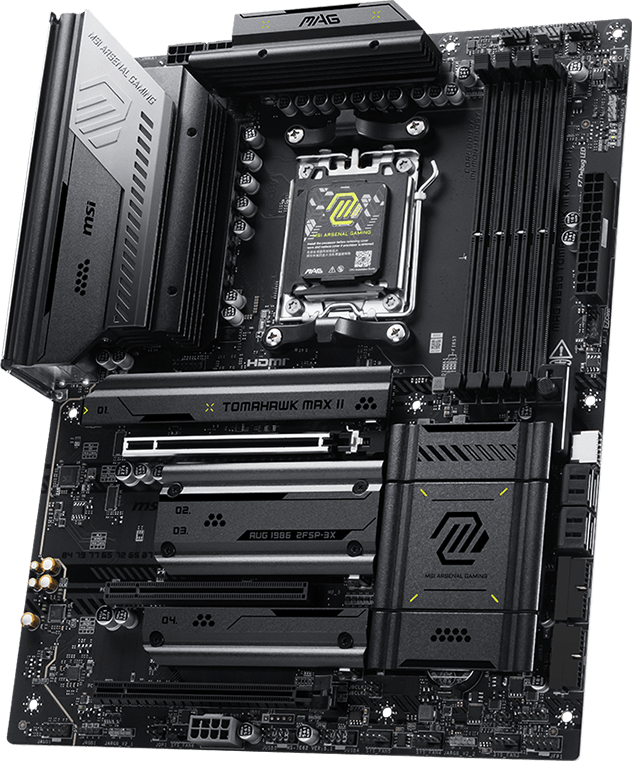
This is where I deliberately stop before X870.
The B850 Tomahawk MAX WiFi II already gives the 9850X3D a PCIe 5.0-capable primary graphics connection, four M.2 positions, 5Gb Ethernet and Wi-Fi 7.
Two M.2 slots can run at Gen5 x4 with Ryzen 9000 desktop CPUs.
The board also includes Flash BIOS, Clear CMOS and diagnostic LEDs.
There is very little a normal gaming build gains by moving to X870 unless USB4 or a specific expansion configuration is required.
One lane-sharing detail
M2_3 shares bandwidth with the lower PCIe expansion slot. For this build, install the primary SN850X in M2_1 and this limitation is irrelevant unless you later populate almost every storage and expansion connection.
G.Skill Flare X5 32GB DDR5-6000 CL30

32GB is the capacity I would use for the default gaming build.
This matched two-DIMM kit runs at DDR5-6000 with CL30-38-38-96 timings through its EXPO profile.
DDR5-6000 is technically memory overclocking on the 9850X3D, so the EXPO profile still depends on the CPU, board and BIOS.
But it is a mature AM5 target with broad platform support.
Its 33mm heat-spreader height is another reason it belongs in this particular build: it is much easier to use underneath a dual-tower air cooler than tall RGB memory.
Keep 32GB if: gaming is the main workload.
Move to 64GB if: the same PC handles heavier editing, streaming, virtual machines or another workload you know exceeds 32GB.
Thermalright Phantom Spirit 120 SE

AMD recommends liquid cooling for optimal 9850X3D performance, but that does not make a 360mm AIO mandatory for a gaming-first PC.
The Phantom Spirit uses seven heatpipes and two 120mm fans in a large dual-tower design.
Independent cooler testing has shown the Phantom Spirit family delivering high-end air-cooling performance without high-end air-cooler pricing.
In this build it also has a clean physical fit: 154mm cooler height inside a case rated for up to 180mm.
Keep it if: the PC is mainly for gaming.
Move to a strong 360mm AIO if: the CPU will frequently run long all-core workloads or you specifically want maximum PBO thermal headroom.
WD_BLACK SN850X 2TB
This is another place where I would refuse the obvious “high-end CPU therefore Gen5 SSD” upgrade.
The 2TB SN850X already reaches up to 7,300MB/s sequential reads and 6,600MB/s writes.
More importantly, recent testing across multiple games found little or no meaningful gaming-performance improvement when moving from PCIe 4.0 to PCIe 5.0 storage.
Gen5 still makes sense for workloads that transfer very large files or can use its much higher sequential bandwidth.
That is not the default requirement of this gaming build.
Use the motherboard’s heatsink
Buy the standard SN850X without its separate heatsink and install it under MSI’s M.2 heatsink. There is no reason to pay for two heatsinks for the same drive.
Corsair RM750x ATX 3.1
SAPPHIRE recommends a minimum 750W PSU for the PULSE RX 9070 XT.
The RM750x matches that requirement while using a modern ATX 3.1 platform rather than buying a larger but lower-quality power supply.
It is fully modular, rated for 750W continuous output and has both conventional PCIe 8-pin and modern 12V-2×6 cabling.
That gives the build flexibility without pretending that an RX 9070 XT system needs 1000W.
When I would choose the RM850x instead
If an RTX 5080 is going into the build—or if a move to an 850W-class GPU requirement is realistically planned during the PSU’s life—use the 850W RM850x instead.
Lian Li LANCOOL 217
The LANCOOL 217 is a particularly good fit for this build because it does not require an additional fan budget immediately.
Lian Li includes two 170mm front intake fans, two 120mm shroud-top intake fans and a rear 140mm fan.
That creates strong GPU airflow straight out of the box.
Independent GamersNexus testing also found the case particularly strong for GPU, VRM and memory thermals.
Maximum GPU length is 380mm and maximum CPU cooler height is 180mm, giving both the PULSE and Phantom Spirit substantial clearance.
It also supports a top-mounted 360mm radiator, which means the case does not need to be replaced if you later move from the Phantom Spirit to a large AIO.
Use it if: you want strong stock airflow and generous ATX component clearance.
Choose another case if: you need a substantially smaller footprint or strongly prefer another aesthetic. Recheck dimensions before substituting it.
How I would change the build for different buyers
1080p high-refresh build
Keep the 9850X3D if very high competitive frame rates are the reason you chose it.
Replace the RX 9070 XT with an RX 9060 XT 16GB.
Do not change the motherboard, RAM or cooler merely because the GPU is smaller.
1440p high-refresh build
Keep the build exactly as shown.
The RX 9070 XT is the configuration’s natural graphics target.
This is the version I would recommend to the largest number of gaming-focused buyers.
4K ray-tracing build
Replace the RX 9070 XT with an RTX 5080.
Replace the RM750x with an RM850x.
Everything else can remain essentially unchanged.
Should this build use 32GB or 64GB of RAM?
I would use 32GB for gaming.
Moving to 64GB generally does not make a game faster simply because the system has more unused memory.
Choose 64GB when the PC also runs workloads such as:
- heavy video editing,
- large Photoshop projects,
- virtual machines,
- large development workloads,
- heavily modified games,
- or multitasking that genuinely exceeds 32GB.
If you need 64GB, replace the 2×16GB kit with a matched 2×32GB kit rather than adding a second unrelated kit.
Should this build use a PCIe 5.0 SSD?
Not by default.
The MSI motherboard supports Gen5 storage, but capability is not the same thing as requirement.
In current gaming, the difference between a strong Gen4 NVMe drive and a Gen5 model is usually much smaller than the sequential-speed specifications suggest.
Where I would spend the difference instead
For a gaming build, I would rather move from a smaller SSD to 2TB or 4TB, improve the GPU, or improve the monitor before paying a large premium solely for Gen5 storage bandwidth.
Should this build use X870 instead of B850?
Only when you can identify the feature you need.
The B850 Tomahawk already gives this system:
- PCIe 5.0 graphics connectivity with the 9850X3D,
- two Gen5-capable M.2 slots,
- four total M.2 positions,
- 5Gb Ethernet,
- Wi-Fi 7,
- BIOS Flashback,
- and modern high-speed USB.
I would move to something like the X870 Tomahawk when USB4 is a real requirement.
I would not move to X870 because the CPU is expensive or because the chipset number is larger.
Should this build use a 360mm AIO?
Not for ordinary gaming.
The 9850X3D is warmer than the 9800X3D under sustained all-core loads, so a strong 360mm AIO has a legitimate use case.
But the complete PC should be built around its actual workload.
Keep the Phantom Spirit if gaming dominates.
Move to the ARCTIC Liquid Freezer III Pro 360 when the system regularly performs long CPU rendering, compilation or similar all-core work.
What monitor makes sense with this build?
The default RX 9070 XT version makes the most sense around a good high-refresh 1440p display.
A 1080p competitive monitor pushes more of the workload toward the CPU and can justify the 9850X3D even with a smaller GPU.
A 4K high-refresh display puts much more pressure on the graphics card and makes an RTX 5080-class upgrade easier to justify.
Do not pick the GPU before the display target
If the monitor is not decided yet, use our Monitor Match Calculator before ordering the graphics card.
Recommended assembly order
- Update or confirm the motherboard BIOS if necessary before the complete system is assembled.
- Install the 9850X3D into the AM5 socket.
- Install the two RAM modules in the motherboard’s recommended two-DIMM positions, normally A2 and B2.
- Install the SN850X in the primary M.2 position and reinstall the motherboard heatsink.
- Install the Phantom Spirit mounting hardware and cooler.
- Mount the motherboard inside the LANCOOL 217.
- Install the RM750x and route the motherboard, CPU and GPU power cables before installing the graphics card.
- Install the RX 9070 XT in the primary CPU-connected PCIe slot.
- Connect both separate PCIe 8-pin GPU power cables cleanly.
- Connect case fans, front I/O and the case fan hub.
What to do after the first successful boot
- Update to a suitable current BIOS if the system is not already using one.
- Load optimized BIOS defaults.
- Enable the G.Skill AMD EXPO memory profile.
- Confirm Resizable BAR / Smart Access Memory is enabled.
- Confirm the SN850X and all 32GB of RAM are detected.
- Confirm CPU and case fans respond correctly to temperature.
- Install the latest AMD chipset drivers.
- Install the latest Radeon graphics driver.
- Run memory, CPU and GPU stability checks before assuming the build is finished.
Do not enable every “performance” BIOS option at once
Build and validate the PC at known-good settings first.
Add PBO, Curve Optimizer or manual tuning later, one change at a time, so instability can actually be diagnosed.
BC Zone video: choosing the GPU for a Ryzen 7 9850X3D
The GPU is the component most likely to change in this build. This BC Zone guide explains the resolution-based choices in more detail and covers the alternatives beyond the default RX 9070 XT.
Where I would not spend extra money
- X870E just because the CPU is high end.
- 64GB or 96GB RAM for gaming alone.
- DDR5-8000 because it has the largest memory-speed number.
- A Gen5 SSD solely for gaming.
- A 360mm AIO if the machine primarily plays games.
- 1000W+ PSU capacity with an RX 9070 XT.
- An RTX 5090 merely because the 9850X3D can technically run it.
- Extra case fans before evaluating the five already supplied.
Every upgrade should solve a real limitation in the completed PC.
The complete build in 30 seconds
Core platform
9850X3D + B850 Tomahawk + 32GB DDR5-6000 CL30. No X870E or extreme RAM required.
Gaming hardware
RX 9070 XT + Phantom Spirit 120 SE for the balanced high-refresh 1440p build.
Supporting parts
2TB SN850X + RM750x + LANCOOL 217 for storage, power and airflow without obvious overspending.
Research each part of the build
Ryzen 7 9850X3D build FAQ
What GPU should I pair with the Ryzen 7 9850X3D?
For most high-refresh 1440p gaming builds, I would start with the Radeon RX 9070 XT. Move down for a lighter 1080p system or up to an RTX 5080 when 4K ray tracing or NVIDIA-specific workloads matter.
Is B850 enough for the Ryzen 7 9850X3D?
Yes. A good B850 motherboard can provide Gen5 graphics and storage, CPU and EXPO overclocking, fast networking and several M.2 slots. X870 is mainly worth paying for when its additional connectivity, particularly USB4, is useful.
Is 32GB RAM enough for a 9850X3D build?
Yes for a gaming-first build. Use 64GB when actual applications, multitasking or heavily modified games regularly require more than 32GB.
What RAM speed should I use?
DDR5-6000 CL30 with AMD EXPO is the configuration I would start with. It is not mandatory, and the 9850X3D is relatively insensitive to extreme memory speeds because of its large 3D V-Cache.
Does the Ryzen 7 9850X3D need liquid cooling?
AMD recommends liquid cooling for optimal performance, but a large dual-tower air cooler remains sensible for a gaming-first system. Sustained all-core work gives a strong 360mm AIO a clearer advantage.
Is 750W enough for a 9850X3D and RX 9070 XT?
SAPPHIRE recommends a 750W minimum PSU for the PULSE RX 9070 XT, so a high-quality 750W unit such as the RM750x is an appropriate pairing for this configuration.
Should I buy an 850W PSU instead?
Buy 850W if you are moving to an RTX 5080 or expect a realistic future GPU upgrade that requires 850W. Do not buy extra wattage solely for the sake of a larger number.
Do I need a Gen5 SSD?
Not for normal gaming. A strong Gen4 NVMe SSD such as the SN850X already provides excellent gaming performance and current testing shows little benefit from PCIe 5.0 storage in most games.
Is 2TB enough storage?
2TB is the capacity I would start with for a high-end gaming build. Choose 4TB when your installed game library or creator files justify it rather than filling multiple small drives unnecessarily.
Will the RX 9070 XT fit in the LANCOOL 217?
Yes. The SAPPHIRE PULSE is approximately 320mm long while Lian Li specifies up to 380mm of GPU clearance.
Will the Phantom Spirit fit in the LANCOOL 217?
Yes. Thermalright specifies the Phantom Spirit 120 SE at 154mm high while Lian Li provides up to 180mm of CPU-cooler clearance.
Can I upgrade this build to an RTX 5080 later?
Yes. The motherboard and case can accommodate that class of GPU, but recheck the exact partner-card dimensions and move to an appropriate 850W PSU if required.
Should I use an RTX 5090 with the 9850X3D?
The CPU can run one, but that does not automatically make it the correct purchase. An RTX 5090 makes sense for a no-compromise 4K or GPU-compute workload, not simply because the processor is high-end.
Specification and testing references
Build compatibility was checked against current manufacturer specifications. Gaming-storage and case-performance conclusions also use independent testing.
- AMD — Ryzen 7 9850X3D specifications
- MSI — B850 Tomahawk MAX WiFi II specifications
- SAPPHIRE — PULSE RX 9070 XT specifications
- G.Skill — Flare X5 DDR5-6000 CL30 specifications
- Thermalright — Phantom Spirit 120 SE specifications
- Tom’s Hardware — Phantom Spirit independent testing
- Sandisk — WD_BLACK SN850X specifications
- Tom’s Hardware — PCIe SSD generation gaming-performance testing
- Corsair — RM750x ATX 3.1 specifications
- Lian Li — LANCOOL 217 specifications
- GamersNexus — LANCOOL 217 thermal testing

- Best GPUs for Small Form Factor Builds in 2026 - August 27, 2026
- Best Mini-ITX AM5 Motherboards in 2026 - August 27, 2026
- Best Micro ATX AM5 Motherboards in 2026 - August 27, 2026