
As an Amazon Influencer, we earn from qualifying purchases you might make if you click any of the links or buttons on this page.
Last reviewed: September 5, 2026
The Ryzen 7 5800X3D is old enough that people often ask the wrong question when upgrading its graphics card:
“What GPU can I use without bottlenecking the CPU?”
That is not how I would choose.
The better question is: what GPU makes sense for the resolution, refresh rate and games you actually play?
That is also why our graphics-card buying guide starts with your display and workload rather than trying to assign every CPU/GPU combination one universal bottleneck percentage.
At 1080p with a very fast GPU, the 5800X3D can become the limit first. At 1440p, especially with High or Ultra settings, the GPU matters much more. And at 4K, GPU performance becomes the dominant concern in most games.
If you’re not sure which performance tier your display actually needs, use the Monitor Match Calculator before spending more on GPU performance your monitor cannot use.
Best GPUs for Ryzen 7 5800X3D in 2026
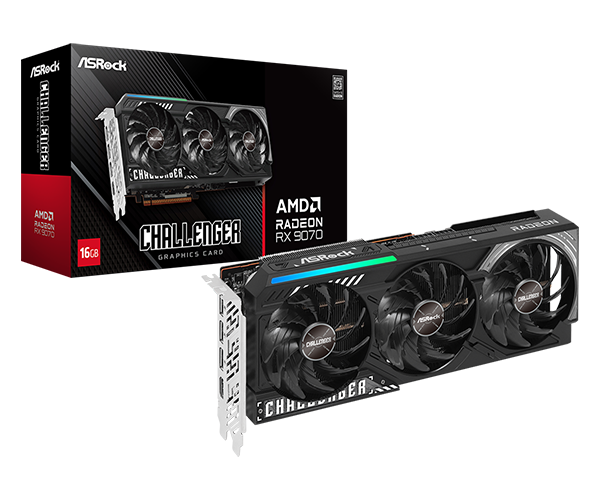
ASRock Radeon RX 9070 Challenger 16GB
The best balance of 1440p performance, 16GB VRAM, power consumption and current price.
- 16GB GDDR6 and 256-bit memory bus
- Excellent High/Ultra 1440p performance
- 220W AMD reference board power
- Limitation: the XT is worth stepping up to if its price premium is small

Sapphire PULSE RX 9060 XT OC 16GB
The sensible lower-cost upgrade for a 5800X3D system targeting 1080p or mainstream 1440p.
- 16GB GDDR6 and 170W board power
- Compact 240mm dual-fan design
- Single 8-pin power connector
- Limitation: not my dedicated 4K recommendation

Gigabyte Radeon RX 9070 XT Gaming OC 16G
The faster option for 4K or GPU-heavy high-refresh 1440p, provided the XT premium stays reasonable.
- About 12% faster than RX 9070 on average
- 16GB GDDR6 and 288mm card length
- Excellent 1440p high-refresh and 4K performance
- Limitation: much higher power demand than RX 9070
Ryzen 7 5800X3D GPU comparison
Swipe → to see the full comparison
| GPU | Best target | VRAM | GPU power | Why it fits the 5800X3D | Main limitation |
|---|---|---|---|---|---|
| RX 9060 XT 16GB | 1080p high refresh / 1440p | 16GB | 160W AMD reference / 170W Sapphire | Great-value way to extend an AM4 build | Not my dedicated 4K choice |
| RX 9070 | 1440p / light 4K | 16GB | 220W | Best current balance of speed, price and power | XT can be worth it when ≤15% more |
| RX 9070 XT | 1440p high refresh / 4K | 16GB | 304W | Faster GPU makes more sense as resolution rises | More heat and diminishing value at a large premium |
| RTX 5070 Ti | 1440p / 4K RT and creator work | 16GB | 300W | DLSS, stronger RT, CUDA and creator ecosystem | Currently much more expensive than Radeon |
| RTX 5060 | 1080p esports only | 8GB | 145W | Efficient, DLSS and Reflex | Weak current value beside RX 9060 XT 16GB |
Why your monitor matters more than a bottleneck percentage
There is no universal percentage that tells you a graphics card is “too fast” for the Ryzen 7 5800X3D.
The same CPU/GPU combination can be CPU-limited in one game and GPU-limited in another. Changing from 1080p Low to 1440p Ultra can change the result again.
That is exactly what TechSpot’s direct Ryzen 7 5800X3D CPU/GPU scaling test demonstrated using the RTX 5090, RTX 5080, RX 9070 and RX 9060 XT 16GB.
At 1440p Ultra, the RX 9070 and RX 9060 XT configurations became heavily or completely GPU-limited. At native 4K Ultra, performance with the RX 9070 and RX 9060 XT was completely GPU-limited, and even with an RTX 5090 the 5800X3D averaged only about 8% behind the Ryzen 7 9800X3D across TechSpot’s four-game sample.
That is why our own PC Bottleneck / Balance Calculator does not pretend that one fake exact percentage can describe every game, resolution and refresh-rate target.
The practical rule
1080p + very high FPS: pay more attention to the CPU ceiling.
1440p High/Ultra: spending more on the graphics card becomes much easier to justify.
4K: put money into the GPU before replacing a perfectly functional 5800X3D platform.
Why the RX 9070 is now the best overall pairing
The original video recommendation favored the RX 9070 XT for most people.
The CPU logic was sound. The market changed.
In TechSpot’s August 2026 multi-region GPU pricing survey , the RX 9070 XT was about 16% more expensive than the RX 9070 across the markets it tracked.
The same publication’s 52-game benchmark found only about a 12% average performance advantage for the XT at both 1440p and 4K.
That currently pushes the RX 9070 slightly ahead on pure value, while it also uses considerably less power.
The recommendation can flip with one sale
The RX 9070 XT is still the faster GPU.
If its premium falls back to roughly 15% or less, I would move up to the XT, especially for 4K.
That is why this guide uses a price-gap rule rather than permanently declaring one GPU the winner.
1. ASRock RX 9070 Challenger 16GB — best overall for Ryzen 7 5800X3D
For most Ryzen 7 5800X3D owners upgrading a gaming PC today, the RX 9070 is where I would start.
It is fast enough to make a substantial 1440p upgrade, capable enough for 4K with sensible settings, and significantly easier to power and cool than the RX 9070 XT.
AMD rates the RX 9070 at 16GB GDDR6, a 256-bit memory interface, 640GB/s memory bandwidth and 220W Typical Board Power .
Why that makes sense with the 5800X3D
TechSpot’s direct scaling test already shows the RX 9070 becoming heavily GPU-limited with the 5800X3D at 1440p Ultra, and fully GPU-limited at 4K Ultra.
That is strong evidence that there is no reason to drop down to a weak graphics card just because the processor uses AM4.
If you’re replacing an older graphics card, use the GPU Upgrade Calculator to check whether the RX 9070 represents a large enough jump from the card you already own.
Why the ASRock Challenger?
ASRock lists the Challenger at 290 × 123 × 51mm, with two 8-pin power connectors and a 700W recommended PSU .
It is therefore a relatively straightforward partner model rather than a huge flagship cooler that erases the RX 9070’s value advantage.
Still, a PC that was originally built several GPU generations ago may have less case clearance than you expect. Check the exact card against your case with the Case / GPU Fit Calculator before ordering.
Who should buy it?
- You mainly game at 1440p.
- You may move to 4K later.
- You want 16GB of VRAM.
- You want a large upgrade without rebuilding the AM4 platform.
- You prefer 220W-class GPU power over the substantially hotter XT.
Who should skip it?
Check the RX 9070 XT price immediately before checkout.
If a good XT costs no more than roughly 15% extra, I would buy the XT.
Our dedicated RX 9070 vs RX 9070 XT comparison tracks that decision in much more detail.
2. Sapphire PULSE RX 9060 XT OC 16GB — best value upgrade
The RX 9060 XT 16GB is the card I would choose when the goal is extending the useful life of an existing AM4 PC without turning the GPU upgrade into another expensive high-end build.
It makes particular sense if the current GPU is around the level of:
- GTX 1660 Super,
- RTX 2060,
- RTX 3060,
- RX 5600 XT,
- RX 5700 XT,
- or RX 6600-class hardware.
For those owners, the 5800X3D still has enough CPU performance that a meaningful GPU upgrade can extend the system for several more years.
Get the 16GB version
This is the important distinction.
I would buy the RX 9060 XT 16GB, not simply whichever RX 9060 XT listing happens to be cheapest.
PC Gamer’s 2026 8GB-vs-16GB testing shows why the difference is not just a specification-sheet argument.
In The Last of Us Part I at 1440p Ultra with Quality upscaling, its RX 9060 XT 16GB averaged 89 FPS with a 72 FPS 1% low, while the 8GB card fell to 60 FPS with a 42 FPS 1% low.
The important point is not that every game needs more than 8GB. It is that the memory limitation can become visible in frame-time consistency and high-setting performance long before the GPU itself feels obsolete.
Our RX 9060 XT 16GB vs RTX 5060 Ti 16GB comparison covers the current midrange choices in more detail.
Easy to drop into an older AM4 build
Sapphire rates this PULSE model at 170W Typical Board Power, one 8-pin power connector and a 450W minimum power supply .
The card is also only around 240mm long.
That makes it much easier to install in an older case or system than many 300W-class high-end GPUs.
Before assuming the existing PSU is automatically fine, run the complete build through the PSU Wattage Calculator .
Who should buy it?
- You game at 1080p or mainstream 1440p.
- You are upgrading from an older mainstream GPU.
- You want 16GB rather than an 8GB compromise.
- Your existing PSU or case favors a lower-power card.
- You want to keep the 5800X3D system rather than rebuild around AM5.
Who should skip it?
If you’re building specifically for 4K, start with the RX 9070 instead.
If you’re not sure whether the jump from your current GPU is substantial enough, check the GPU Upgrade Calculator rather than buying simply because the card is newer.
3. Gigabyte RX 9070 XT Gaming OC 16G — best for 4K
If the goal is 4K, or high-refresh 1440p in graphically demanding games, the RX 9070 XT is the step up.
TechSpot’s 52-game benchmark found the XT about 12% faster on average at both 1440p and 4K than the standard RX 9070.
The 5800X3D is not a reason to avoid that extra GPU performance at 4K. Its direct scaling results show that the graphics card becomes the dominant limit long before this CPU becomes unusable.
For a broader look at this performance tier, see our Best Value 4K GPUs guide.
The 15% price rule
XT costs 0–10% more: buy RX 9070 XT easily.
XT costs 10–15% more: I still favor the XT, particularly at 4K.
XT costs more than about 15% extra: the RX 9070 usually becomes the better-value choice.
Power is the real tradeoff
AMD rates the RX 9070 XT at 304W Typical Board Power with a 750W minimum PSU recommendation .
That is an 84W increase over the RX 9070’s 220W reference rating.
So the XT’s extra performance also means:
- more heat inside the case,
- more demanding PSU requirements,
- and potentially more fan noise.
The Gigabyte Gaming OC needs more planning
Gigabyte lists this model at 288 × 132 × 56mm, with three 8-pin connectors and an 850W recommended PSU .
That 850W recommendation is specific to Gigabyte’s factory-overclocked card.
Before buying, check both the PSU Wattage Calculator and Case / GPU Fit Calculator .
And do not overpay for this exact cooler. If a Sapphire Pulse, PowerColor Reaper/Hellhound, ASRock Challenger or another competent RX 9070 XT is meaningfully cheaper, the cheaper card may be the smarter buy.
Want NVIDIA? The RTX 5070 Ti is the feature-first alternative
The RTX 5070 Ti still makes sense with the Ryzen 7 5800X3D.
The issue is not CPU compatibility. It is current GPU pricing.
TechSpot’s August 2026 market survey had the RTX 5070 Ti roughly 50% more expensive than the RX 9070 XT across its ten tracked regions.
That is very difficult to justify for conventional raster gaming.
But NVIDIA can still be worth paying more for if you specifically need:
- stronger ray tracing or path tracing,
- DLSS,
- Reflex,
- CUDA,
- OptiX,
- Blender or other NVIDIA-favored creator software,
- NVIDIA Studio,
- or its encoding ecosystem.
If you’re deciding between graphics-card ecosystems rather than only raw FPS, the broader criteria in our How to Choose a Graphics Card guide are more useful than comparing one benchmark average.
Buy the RTX 5070 Ti for features, not today’s raster value
A large sale can change this quickly.
If the RTX 5070 Ti comes close to RX 9070 XT pricing, its stronger feature stack becomes much easier to justify.
What happened to the RTX 5060 recommendation?
The original video used the RTX 5060 8GB for the specific 1080p high-refresh esports buyer.
That use case still makes sense. The current pricing does not.
TechSpot’s August pricing survey found the RTX 5060 around $450 in the U.S., while the RX 9060 XT 16GB was around $460.
At anything close to that price relationship, I would buy the RX 9060 XT 16GB.
The Radeon provides twice the VRAM and is a much healthier option if you later start playing heavier single-player games or move to 1440p.
When would the RTX 5060 still make sense?
Only when:
- you mainly play competitive 1080p games,
- NVIDIA Reflex or DLSS matters specifically to you,
- you don’t need high-texture AAA performance,
- and the RTX 5060 is clearly cheaper than the RX 9060 XT 16GB.
1080p: where the CPU limit matters most
This is the resolution where buying an unnecessarily expensive GPU can waste the most money.
At 1080p, especially with competitive or Medium/Low settings, the graphics card can finish frames quickly enough that the CPU becomes the main constraint.
That is why pairing a 5800X3D with an RTX 5090-style GPU for a 1080p esports monitor is a completely different decision from using the same CPU at 4K.
If maximum esports FPS is your goal, check your exact CPU/GPU target with the PC Bottleneck / Balance Calculator and match that result against your display using the Monitor Match Calculator .
My 1080p recommendation
For most buyers, the RX 9060 XT 16GB is already plenty of GPU.
Spend beyond that only if your specific games and monitor can use the additional performance.
1440p: the sweet spot for Ryzen 7 5800X3D
This is where the processor still looks particularly strong.
At 1440p High or Ultra, modern games put enough load onto the GPU that the 5800X3D remains a highly effective gaming processor.
That is why the RX 9070 is my default recommendation.
Move down to RX 9060 XT 16GB when…
- your budget matters more,
- your existing GPU is much slower,
- your monitor is closer to 60–165Hz,
- or lower power and easier case compatibility matter.
Move up to RX 9070 XT when…
- your 1440p monitor is very high refresh,
- you play GPU-heavy AAA games,
- you may move to 4K,
- or the XT is within roughly 15% of RX 9070 pricing.
If you’re unsure whether the extra GPU tier is large enough to notice, the GPU Upgrade Calculator can compare it against your existing card.
4K: keep the 5800X3D and spend on the GPU
At native 4K, the graphics card usually becomes the primary performance constraint.
TechSpot’s direct scaling test found the RX 9060 XT 16GB and RX 9070 completely GPU-limited at 4K Ultra. The RTX 5080 was largely GPU-limited as well, and even with an RTX 5090 the 5800X3D averaged only around 8% behind the 9800X3D in its four-game sample.
For 4K, upgrade the GPU before replacing a healthy AM4 platform
If your existing 5800X3D system is otherwise working well, a large graphics-card upgrade will normally change your 4K experience far more than swapping the CPU while keeping the old GPU.
For the full current 4K market rather than only 5800X3D pairings, see: Best Value 4K GPUs in 2026 .
RX 9070 vs RX 9070 XT with the 5800X3D
There is no special CPU-specific rule here.
The same things that decide this comparison in any gaming PC still apply:
- resolution,
- GPU performance,
- price,
- power supply,
- case cooling,
- and physical fit.
The rule
XT ≤15% more: buy RX 9070 XT.
XT more than ~15% extra: buy RX 9070 for better value.
See: RX 9070 vs RX 9070 XT: Which Should You Buy?
How much VRAM do you want for this upgrade?
For a graphics card that may become the final major upgrade of a 5800X3D system, 16GB is where I prefer to land.
That is why all three primary recommendations have 16GB.
This does not mean every game needs more than 8GB.
It means 16GB gives you substantially more margin for:
- high-resolution textures,
- 1440p Ultra,
- 4K,
- ray tracing,
- and future games.
The current RX 9060 XT 8GB-versus-16GB results are a good example of why capacity can affect more than average FPS.
Will PCIe 4.0 limit these GPUs?
AMD specifies the Ryzen 7 5800X3D as an AM4 processor with PCIe 4.0 support .
The RX 9060 XT, RX 9070 and RX 9070 XT are PCIe 5.0-generation graphics cards.
That does not mean you need a new motherboard.
PCI-SIG confirms that PCIe generations are designed for backward compatibility , so a PCIe 5.0 graphics card can operate on an older compatible PCIe link.
A proper PCIe 4.0 x16 graphics slot is not a reason to replace a healthy B550 or X570 motherboard.
See our full: PCIe 4.0 Motherboard Guide .
What about B450 and X470 motherboards?
AMD officially lists B450 and X470 among the chipsets that can support the Ryzen 7 5800X3D, subject to the motherboard manufacturer’s BIOS support.
If you’re still using one of those boards, verify:
- the current BIOS,
- the actual GPU-slot generation and width,
- Resizable BAR support,
- your PSU,
- and physical GPU clearance.
You can also run the exact board and CPU through the Motherboard Compatibility Tool before changing multiple parts at once.
Check your old PSU before installing a modern GPU
A lot of Ryzen 7 5800X3D systems were assembled several years ago.
That makes the power supply one of the most important parts to inspect before installing a modern high-end GPU.
| Featured GPU | Board / GPU power | Featured-card PSU guidance | Power connectors |
|---|---|---|---|
| Sapphire RX 9060 XT 16GB | 170W | 450W minimum | 1 × 8-pin |
| ASRock RX 9070 Challenger | 220W reference GPU | 700W ASRock recommendation | 2 × 8-pin |
| Gigabyte RX 9070 XT Gaming OC | 304W reference GPU | 850W Gigabyte recommendation | 3 × 8-pin |
| ASUS Prime RTX 5070 Ti | 300W GPU class | 750W-class recommendation | 16-pin |
Instead of treating those manufacturer recommendations as a complete PSU calculation, enter your CPU, GPU, drives and fans into the PSU Wattage Calculator .
Make sure the graphics card fits your existing case
A case that comfortably fit an RTX 2060, GTX 1660 Super or RX 5700 XT may not automatically fit a modern triple-fan card.
The three featured models are roughly:
- Sapphire PULSE RX 9060 XT: 240mm long
- ASRock RX 9070 Challenger: 290 × 123 × 51mm
- Gigabyte RX 9070 XT Gaming OC: 288 × 132 × 56mm
Also check:
- slot thickness,
- front-radiator interference,
- side-panel clearance,
- power-connector clearance,
- and airflow around the card.
Use the Case / GPU Fit Calculator before placing the order.
If the case itself is especially restrictive, our Best GPUs for Small Form Factor Builds guide ranks cards specifically by length, thickness and power requirements.
Should you replace the 5800X3D instead?
If you already own this processor, I would not replace the platform merely because the CPU was launched in 2022.
Tom’s Hardware’s June 2026 re-review still describes the 5800X3D as the fastest DDR4 gaming CPU, while correctly pointing out that it makes much more sense for people already invested in AM4 than for a completely new build.
Keep the 5800X3D if…
- You mainly game at 1440p or 4K.
- Your existing GPU is clearly the main performance limit.
- Your current CPU performance already meets your monitor target.
- You want the cheapest route to a large gaming-performance upgrade.
Consider moving to AM5 if…
- you mainly play at 1080p with a very fast GPU,
- you target extreme competitive frame rates,
- your specific games are demonstrably CPU-limited,
- or you also need a major productivity upgrade.
Do not build a brand-new 5800X3D PC in 2026 because this guide recommends strong GPUs for it
This guide is primarily for people who already own an AM4 system.
If you’re buying a CPU, motherboard and RAM from scratch, a newer platform provides a better long-term upgrade path.
For an existing AM4 machine, our Ryzen 7 5800X3D PC Builds guide can help with the rest of the component choices.
Which upgrades are actually worth making?
From RTX 3060-class hardware
The RX 9060 XT 16GB is a meaningful starting point.
The RX 9070 is the more transformative 1440p upgrade, while the RX 9070 XT is appropriate if you’re also moving toward 4K.
From RX 6600 or RX 5700 XT
The RX 9060 XT 16GB is already a substantial modernization.
If the budget allows, the RX 9070 makes the upgrade feel considerably larger.
From RX 6800 or RX 7800 XT
Be much more selective.
I would not move from one of these 16GB GPUs to an RX 9060 XT.
Start with the RX 9070, and preferably consider the RX 9070 XT if you want a clearly larger performance jump.
Before spending hundreds of dollars on a modest sidegrade, use the GPU Upgrade Calculator .
What GPU should you use for your monitor?
RX 9060 XT 16GB
The sensible choice for most 1080p systems, including high-refresh gaming without adding RX 9070 XT-class heat and expense.
RX 9070 16GB
The sweet spot for the 5800X3D: strong GPU performance, 16GB VRAM and a more sensible power envelope than the XT.
RX 9070 XT 16GB
At 4K the GPU increasingly becomes the limiting component, making the faster XT much easier to justify.
For your exact display, use: Monitor Match Calculator .
Watch: Best GPUs for Ryzen 7 5800X3D in 2026
The BC Zone video below explains the monitor-first logic behind this guide.
The main update since that video’s original recommendation is pricing: the RX 9070 now has the stronger overall-value position, while the RX 9070 XT becomes the step-up when its premium is roughly 15% or less.
Five mistakes to avoid
- Choosing from one bottleneck percentage. CPU/GPU balance changes with resolution, game, quality settings and target frame rate.
- Buying an 8GB card because it is slightly cheaper. When the RX 9060 XT 16GB is close in price, the extra memory is much easier to justify for a long-term upgrade.
- Spending RX 9070 XT money for 1080p esports without checking your CPU-side limit. A faster GPU cannot remove a frame-rate ceiling caused by the CPU.
- Replacing AM4 because the new GPU says PCIe 5.0. PCIe graphics generations are backward compatible.
- Ignoring the PSU and case because they worked with the old GPU. Modern cards can require substantially more power, cooling and physical space.
Final verdict
The Ryzen 7 5800X3D remains strong enough that I would not artificially limit its graphics card simply because it is an AM4 processor.
What I would buy
Most people / 1440p: RX 9070 16GB.
Lower-cost 1080p and 1440p upgrade: RX 9060 XT 16GB.
4K or heavier GPU workloads: RX 9070 XT 16GB, provided it costs no more than about 15% above the RX 9070.
The RTX 5070 Ti remains the NVIDIA alternative when ray tracing, DLSS, CUDA or creator applications genuinely matter, but today’s pricing makes it difficult to recommend on gaming value alone.
And I would not make the RTX 5060 8GB a main recommendation while its price sits close to the RX 9060 XT 16GB.
Most importantly: buy for your monitor and games, not for the age of the CPU.
More Best Motherboard Zone guides
RX 9070 or RX 9070 XT?
Compare the performance gap, power difference and live price rule.
Buying specifically for 4K?
Compare today’s main 4K-value tiers independently of CPU choice.
Shopping one GPU tier lower?
Compare today’s two main 16GB mainstream options.
Choosing a GPU from scratch?
Start with resolution, VRAM, features, power, case fit and current price.
Is the upgrade big enough?
Compare your current GPU with the new card before paying for a sidegrade.
Match the GPU to your monitor
Check resolution and refresh rate before paying for performance your display cannot use.
Check CPU/GPU balance
Estimate whether your target is more CPU-limited or GPU-limited without using a fake universal percentage.
Check your power supply
Estimate the complete system’s wattage and headroom.
Will the graphics card fit?
Check GPU length, thickness, radiator interference and cable clearance.
Building the whole 5800X3D PC?
See complete component combinations rather than only GPU recommendations.
Building in a compact case?
Compare graphics cards specifically by physical size, power and cooling.
Concerned about PCIe 4.0?
Learn how current PCIe 5.0 GPUs behave on an older PCIe 4.0 platform.
Ryzen 7 5800X3D GPU FAQ
What is the best GPU for Ryzen 7 5800X3D in 2026?
For most owners, I would buy the Radeon RX 9070 16GB. It is an excellent 1440p pairing, can handle 4K, and currently offers a better balance of price, performance and power than the RX 9070 XT.
Is the RX 9070 too powerful for the Ryzen 7 5800X3D?
No. Direct scaling tests show the combination becoming heavily GPU-limited at 1440p Ultra and fully GPU-limited at 4K. At low-setting 1080p, the CPU can become a more important limitation.
Is the RX 9070 XT too powerful for the 5800X3D?
Not for 4K, and generally not for GPU-heavy 1440p gaming. At very high frame rates in CPU-sensitive games, the processor can prevent the GPU from reaching its maximum possible performance.
What is the best value GPU for Ryzen 7 5800X3D?
The RX 9060 XT 16GB is my lower-cost recommendation. It provides strong 1080p and useful 1440p performance without the VRAM compromise of current 8GB cards.
Is RX 9060 XT 16GB good with Ryzen 7 5800X3D?
Yes. TechSpot’s direct scaling tests became completely GPU-limited with this pairing at 1440p Ultra, showing the 5800X3D has more than enough CPU performance for the card.
Should I buy RX 9060 XT 8GB or 16GB?
I recommend the 16GB version. Current testing has shown situations where the 8GB card suffers much worse 1% lows and larger performance losses at demanding settings.
Should I buy RTX 5060 for Ryzen 7 5800X3D?
Only for a narrow 1080p competitive use case and when it is substantially cheaper than the RX 9060 XT 16GB. At similar prices, I prefer the 16GB Radeon.
Is RTX 5070 Ti good with Ryzen 7 5800X3D?
Yes, particularly at 1440p and 4K. Its main problem is current pricing rather than the CPU pairing. Choose it when NVIDIA-specific RT, DLSS, CUDA or creator features justify the premium.
What GPU should I use with 5800X3D for 1080p?
The RX 9060 XT 16GB is my default recommendation. Do not automatically buy a much faster GPU for a 1080p esports monitor without checking whether the system is already CPU-limited.
What GPU should I use with 5800X3D for 1440p?
The RX 9070 is the sweet spot. Move to RX 9070 XT when its premium is small or when you target very high refresh rates in GPU-heavy games.
What GPU should I use with 5800X3D for 4K?
I would choose RX 9070 XT when its price is reasonable. The RX 9070 is the lower-cost alternative. At 4K, the graphics card becomes much more important than the CPU.
How much extra should I pay for RX 9070 XT?
My cutoff is approximately 15%. Recent 52-game testing has the XT about 12% faster on average, so a much larger price premium weakens its value.
Does Ryzen 7 5800X3D support PCIe 5.0?
No. AMD specifies the 5800X3D for PCIe 4.0. PCIe 5.0 graphics cards remain backward compatible with appropriate PCIe 4.0 slots.
Will PCIe 4.0 bottleneck RX 9070?
A full PCIe 4.0 x16 graphics connection is not a reason to replace a healthy 5800X3D platform for the RX 9070.
Do I need a new motherboard for an RX 9000 GPU?
No. A compatible AM4 motherboard with an appropriate PCIe slot can use the graphics card. Check BIOS support, power supply, case fit and connectors as well.
Should I upgrade from the 5800X3D to AM5 before buying a GPU?
Usually not if you mainly play at 1440p or 4K and the current GPU is the limitation. AM5 becomes more compelling for very high-refresh CPU-limited gaming, productivity or a broader platform upgrade.
Is Ryzen 7 5800X3D still good in 2026?
Yes. It remains one of the strongest gaming CPUs available for an existing DDR4/AM4 system, particularly as resolution and GPU load increase.
Should I build a new PC around Ryzen 7 5800X3D in 2026?
Generally no. Its value is strongest as an upgrade or as a processor you already own. A completely new system is better served by a newer platform with a longer upgrade path.
Is 16GB VRAM overkill for Ryzen 7 5800X3D?
No. VRAM requirements are determined primarily by the GPU workload, resolution, settings and game—not by the CPU socket.
Can Ryzen 7 5800X3D handle 4K gaming?
Yes. At 4K, gaming is normally much more GPU-limited, which lets the 5800X3D remain competitive beside substantially newer CPUs.
Can Ryzen 7 5800X3D handle 240Hz gaming?
Yes in many games, but whether you reach 240 FPS depends heavily on the title. CPU-sensitive games expose the 5800X3D’s limits earlier than GPU-heavy games.
What PSU do I need for RX 9070 with Ryzen 7 5800X3D?
AMD’s baseline RX 9070 recommendation is 650W, while the featured ASRock Challenger specifies 700W. The right PSU depends on the complete system and the quality of the unit.
What PSU do I need for RX 9070 XT with Ryzen 7 5800X3D?
AMD recommends 750W for the reference RX 9070 XT specification. The featured Gigabyte Gaming OC recommends 850W. Follow the exact graphics-card model and calculate the complete system load.
Research and specification sources
- TechSpot — Ryzen 7 5800X3D CPU and GPU Scaling
- TechSpot — RX 9070 vs RX 9070 XT 52-Game Benchmark
- TechSpot — Q3 2026 GPU Pricing
- PC Gamer — 8GB vs 16GB GPU Testing in 2026
- Tom’s Hardware — Ryzen 7 5800X3D 2026 Re-Review
- AMD — Ryzen 7 5800X3D Specifications
- AMD — Radeon RX 9060 XT Specifications
- AMD — Radeon RX 9070 Specifications
- AMD — Radeon RX 9070 XT Specifications
- ASRock — Radeon RX 9070 Challenger 16GB
- Sapphire — PULSE Radeon RX 9060 XT OC 16GB
- Gigabyte — Radeon RX 9070 XT Gaming OC 16G
- NVIDIA — GeForce RTX 5070 Ti
- NVIDIA — GeForce RTX 5060
- PCI-SIG — PCIe Backward Compatibility

- Best GPU Upgrades for AM4 in 2026: What to Buy for Each Ryzen CPU - September 5, 2026
- Best GPUs for Ryzen 7 5800X3D in 2026: 1080p, 1440p & 4K - September 5, 2026
- RX 9070 GRE vs RX 9070: Which Should You Buy in 2026? - September 4, 2026